IndexNow and Fast Indexing: What Automated Publishers Should Ping After Publish

Automated publishing makes “fast indexing” sound like a button: the page goes live, a ping fires, and search engines are supposed to catch up. IndexNow is not that button. It is a change notification you send when a URL is added, updated, or deleted, because ordinary crawler discovery can take days or weeks. One valid submission to any participating endpoint is shared with the other IndexNow-enabled engines. Google is not on that list, and an IndexNow ping does nothing for Google.
The useful contract is fail-closed. After the publish gate passes, ping only URLs that were just added, meaningfully changed, redirected, or removed with a 404 or 410. Refuse drafts, noindex pages, carts, on-site search, and unchanged archive dumps. A bulk POST can carry up to 10,000 URLs, but every submitted URL still counts toward crawl quota, and submitting a URL does not guarantee immediate indexing.
What comes back is a receipt, not a ranking. HTTP 200 means the URL was received; HTTP 202 means the key check is still pending. A 403, 422, or 429 is a stop, not a retry loop. Bing Webmaster Tools IndexNow Insights is where you later see submitted, crawled, and indexed. Ordinary articles still reach Google through the sitemap and Search Console. Google’s Indexing API is a separate tool, limited to pages with JobPosting or BroadcastEvent inside a VideoObject.
- IndexNow notifies participating engines of adds, updates, redirects, and removals; it does not guarantee indexing and does not reach Google.
- One valid submission is shared across IndexNow engines; Google’s Indexing API is a separate, narrow channel.
- Ping only post-publish URLs that actually changed, and refuse drafts, noindex pages, carts, search URLs, and archive dumps.
- Host an 8–128 character UTF-8 key, treat HTTP 200 as received, and stop on 403, 422, and 429.
- Confirm outcomes in Bing IndexNow Insights, and keep ordinary Google discovery on the sitemap plus Search Console.
What Is IndexNow, and Which Search Engines Actually Get the Ping?
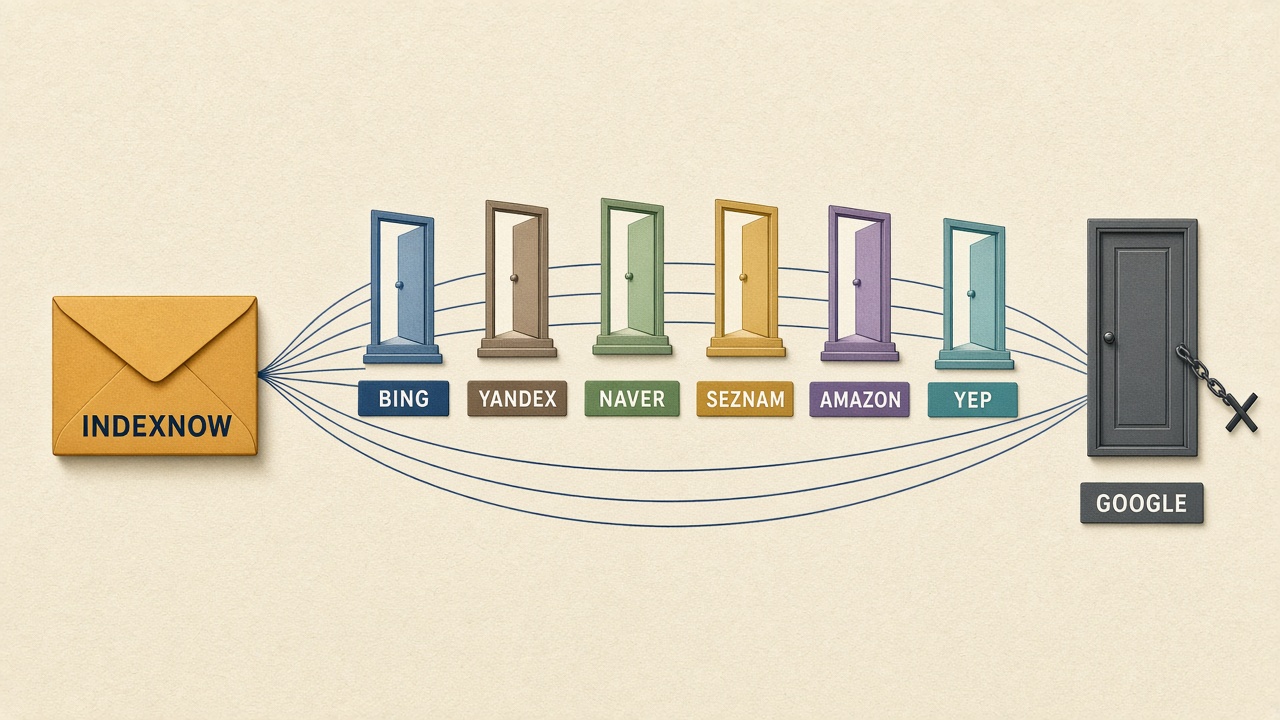
IndexNow is a shared change ping, not an index button and not a ranking lever. It notifies participating search engines that a URL was added, updated, or deleted, which matters because ordinary crawler discovery can take days or weeks. A successful ping only means the notice was received. It does not guarantee a crawl, an index entry, or a better position.
You submit once. A single submission to any participating endpoint is shared with the other IndexNow-enabled engines, so there is no reason to fire the same URL at every partner. Official single-URL endpoints are the global API plus Amazon, Bing, Naver, Seznam.cz, Yandex, and Yep. After a participating engine verifies a submission, it must share those URLs with the other participants within 10 seconds.
Google is not on the list
Google is not an IndexNow participant. It said in November 2021 that it would test the protocol, and it has not adopted it, so the ping does nothing for Google. Treat any plugin claim that it “submits to Google” as a separate path, and usually the wrong one. Ordinary articles still depend on a sitemap and Search Console, not this notice.
The Bing-side scale is discovery context, not a ranking claim. By March 2024, IndexNow had grown to 2.5 billion submitted URLs, and 17% of URLs clicked in Bing web results came from IndexNow. That shows the protocol is carrying real click traffic on Bing. It does not mean a ping moves a page up the results.
Shared ping, not Google — IndexNow tells participating engines—via the global API, Amazon, Bing, Naver, Seznam.cz, Yandex, and Yep—that a URL changed. It is not a Google channel and not a guarantee of crawl or rank.
What to Ping the Moment a Page Goes Live—and What Never to Submit
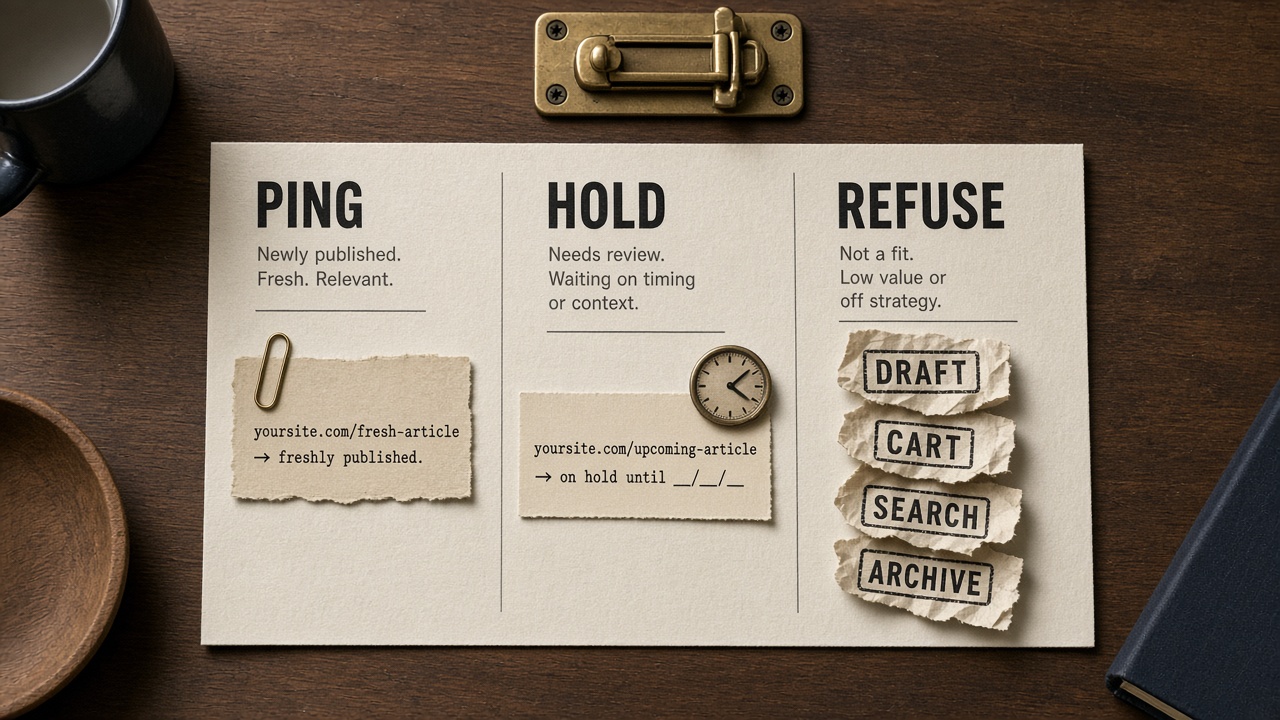
Ping the single URL that just passed the publish gate: a new indexable article, or a live article whose content actually changed in a way a reader would notice. A removal or a redirect is the same kind of real change; how those notices are sent comes next. Do not treat the ping as a Google index button, and do not open the archive and submit it.
That contrast is a quota decision, not a style preference. Every URL submitted through IndexNow counts toward the site’s crawl quota. A noisy stack spends the budget it wanted for the new page, then wonders why the page that mattered is still waiting.
URLs that should never be submitted
- The archive dump, and any republish where the article did not meaningfully change.
- Drafts, previews, and anything the quality gate has not signed.
- Noindex pages, internal search results, carts, accounts, and faceted URLs.
Hold, do not ping, when the canonical is unset, the page is still thin, or the review date is empty. Those are incomplete contracts, not slow submissions. The gate belongs to how automated SEO publishing works—quality signed, then notify—not to a submitter tool that fires because a save happened.
One decision, one reason code
| Decision | When | Reason code |
|---|---|---|
| Ping | New indexable URL, or a meaningful update that passed the gate | passed-gate |
| Hold | Canonical unset, page still thin, or review date empty | incomplete-contract |
| Refuse | Draft, preview, noindex, search, cart, account, facet, unchanged republish, or unsigned archive URL | not-a-change |
Store that reason code with the URL. When someone asks later why a page was or was not pinged, the concierge cites the rule instead of guessing from a log of HTTP calls.
One live URL — Ping only the live URL that just became a real, indexable change. Hold an incomplete page. Refuse everything the quality gate has not signed—crawl quota is not free.
Can You Submit Deleted, 404, and Redirected URLs?
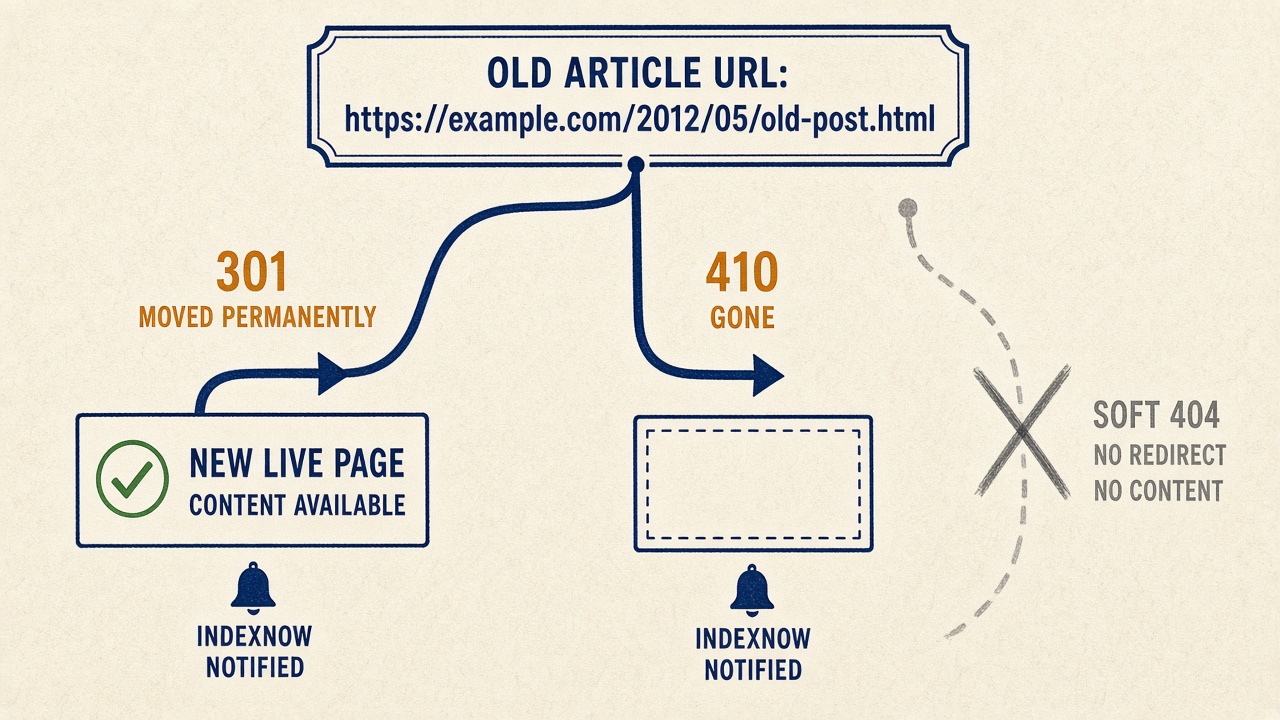
Those cases were held until the URL’s new state was real. Once the removal or redirect is live, the answer is yes: submit redirected URLs and pages that now return HTTP 404 or HTTP 410 so participating indexes can drop or update them. IndexNow.org’s FAQ states that directly.
Send the old URL—the one engines already know—not a soft-404 stand-in that still returns 200, and not the destination alone. If that destination is a new article that just went live, it gets its own add ping under the publish gate. The removal notice and the new-page notice are separate changes.
Do this only after the redirect or the 404/410 is actually being served. A ping of a URL that still returns 200 teaches the engine the wrong state: the page looks fine, so there is nothing to drop or retarget.
Log the final status code and the redirect target next to the ping. A later audit then distinguishes a deliberate removal from a broken publish that never left 200.
Live status first — Ping the old URL only after it returns 404, 410, or a live redirect, and record that status and target so the notice matches what the server is actually serving.
How Do You Set Up the IndexNow Key File on WordPress or Shopify?
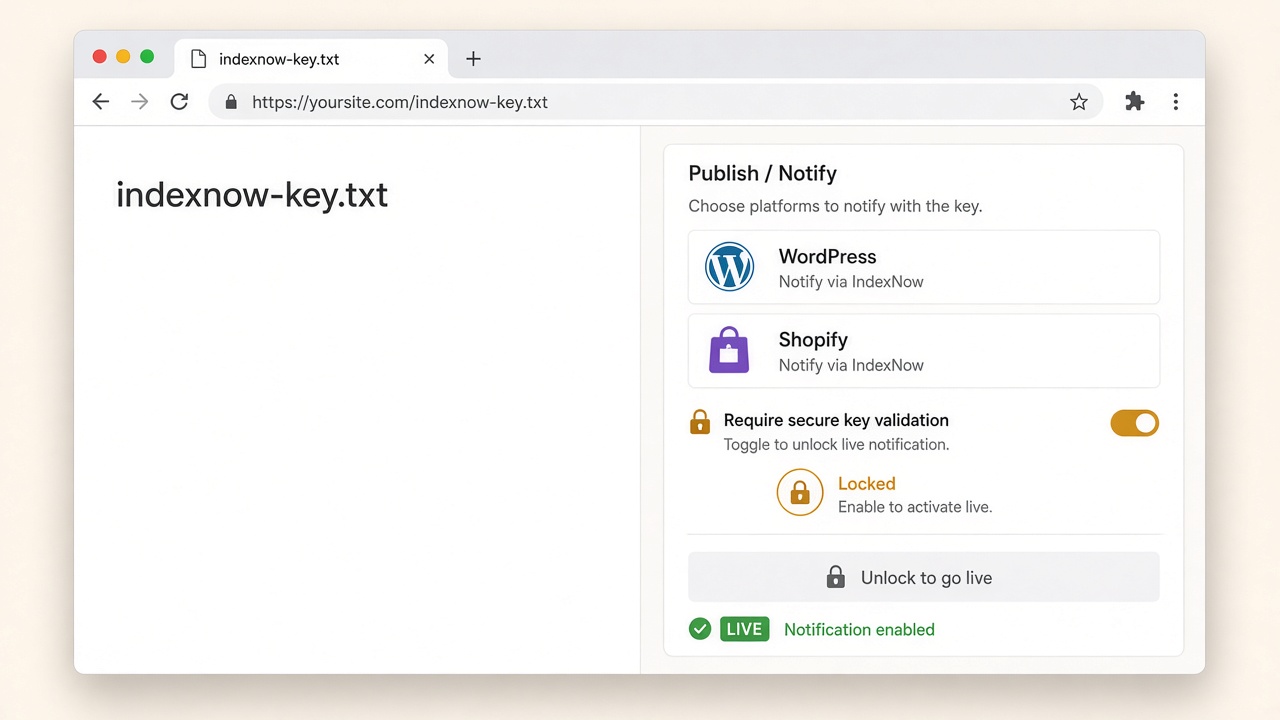
Once a removal or redirect is live and ready to ping, the stack still needs one proof of ownership before any URL leaves your publisher. Generate a single key of 8 to 128 characters using only letters, numbers, and hyphens, and host it as a UTF-8 text file whose body is that key and nothing else. Prefer the site root so the file is served at your host as plain text. Use keyLocation only when the file cannot live there.
Turn the sender on after the file proves the key
WordPress and Shopify can send IndexNow natively or through a plugin, and Cloudflare can send it at the CDN. Enable whichever sender you actually use only after the key file returns the key as plain text. Verify ownership once per host. A key that does not match the host is a stop, not a prompt to mint a second key and retry in a loop.
The sender must fire after the publish contract passes—the same gate that already decided a URL is a real add, meaningful update, redirect, or removal. It must not fire on draft save, autosave, or a merchant clicking Update when nothing indexable changed. One key, one host, one ping after the page is live.
Key first — Host one 8-to-128-character key as a UTF-8 text file at the site root, confirm it returns as plain text, then let WordPress, Shopify, or Cloudflare ping only after the publish contract passes.
What 200, 202, 403, 422, and 429 Mean After You Ping
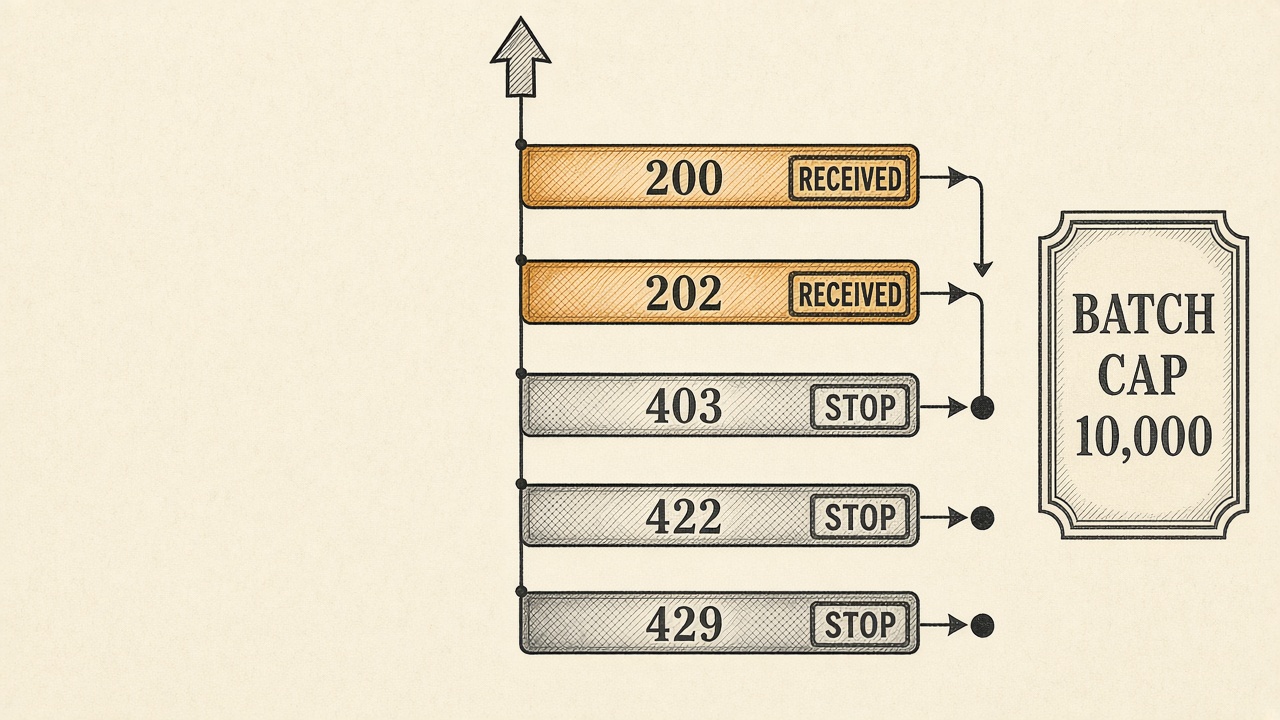
Once that send leaves the line, the status code is the whole answer. HTTP 200 means the URL was received, not indexed. HTTP 202 means the key check is still pending. Neither code is a reason to resubmit.
A 403 means the key is invalid. A 422 means the URLs do not belong to the host, the key fails the schema, or the batch is over the cap. A 429 means too many requests. All three are fail-closed stops: halt the job, do not quietly try again.
One bulk POST may carry up to 10,000 URLs. More than that can fail with 422. Batch well under the cap, and never split a refusal into a retry storm.
Endpoint hopping does not create a second chance. Participating engines already share a verified ping, so a 429 is a rate limit, not a routing problem.
Fail closed — 200 and 202 close the send as receipt only. 403, 422, and 429 stop the line until the key, the URL list, or the request rate is fixed, and every bulk POST stays under 10,000 URLs.
Should You Resubmit an Article That Is Not Indexed Yet?

No. A missing index is not a failed ping, and resubmitting the same article will not force it in.
Submitting a URL does not guarantee immediate indexing. Engines still apply crawl quota, scheduling, and quality checks after the notice lands, so a quiet index is a later decision, not proof the ping never arrived.
Do not resubmit the same URL repeatedly. Wait at least five minutes between updates, and send it again only after a meaningful update, a removal, or a redirect. An unchanged article that is not indexed yet is a hold, not a new change.
Confirm receipt in Bing Webmaster Tools IndexNow Insights before you escalate. It reports URLs as submitted, crawled, and indexed, including the latest 1,000 submitted URLs and whether they were submitted late. A received ping with no crawl yet belongs with the cluster’s indexing SLA and the monthly index-health KPIs—not as an outage, and not as a cue to ping again.
How long to wait before a new article is a hold, rather than a failed ping, is that SLA. If the piece was thin or the review gate was skipped, fix the page. Another ping will not repair a URL the engine already chose not to keep.
Don't resubmit — A missing index after a received ping is a hold, not a failed submission. Wait at least five minutes and ping again only after a real change, removal, or redirect.
Do You Still Need an XML Sitemap If IndexNow Is On?
A ping that was received and not yet crawled does not retire the sitemap. Yes: keep a clean XML sitemap of indexable URLs. IndexNow is a change notice, not a stand-in for ongoing discovery, and it is not a reason to dump the archive.
IndexNow.org’s FAQ is direct: the protocol is “not designed for submitting every URL on your site at once.” The one exception is a recent migration or redesign, when engines need a one-time map of what moved. After that window, return to change-only pings and leave the sitemap as the standing list of indexable URLs.
IndexNow also does not make Copilot or other AI answers cite the article. Citation help is a separate llms.txt job: a machine-readable map of clusters, not a second robots.txt and not another ping. Readers who want that file should follow the site’s llms.txt generator guide. This pipeline stays limited to change notification.
Keep both — IndexNow tells participating engines about real changes; the XML sitemap remains the ongoing discovery list, and llms.txt—not another ping—is the file you publish if you want a machine-readable map for AI citation.
When the Google Indexing API Is Allowed, and When Blog Posts Are Off-Policy
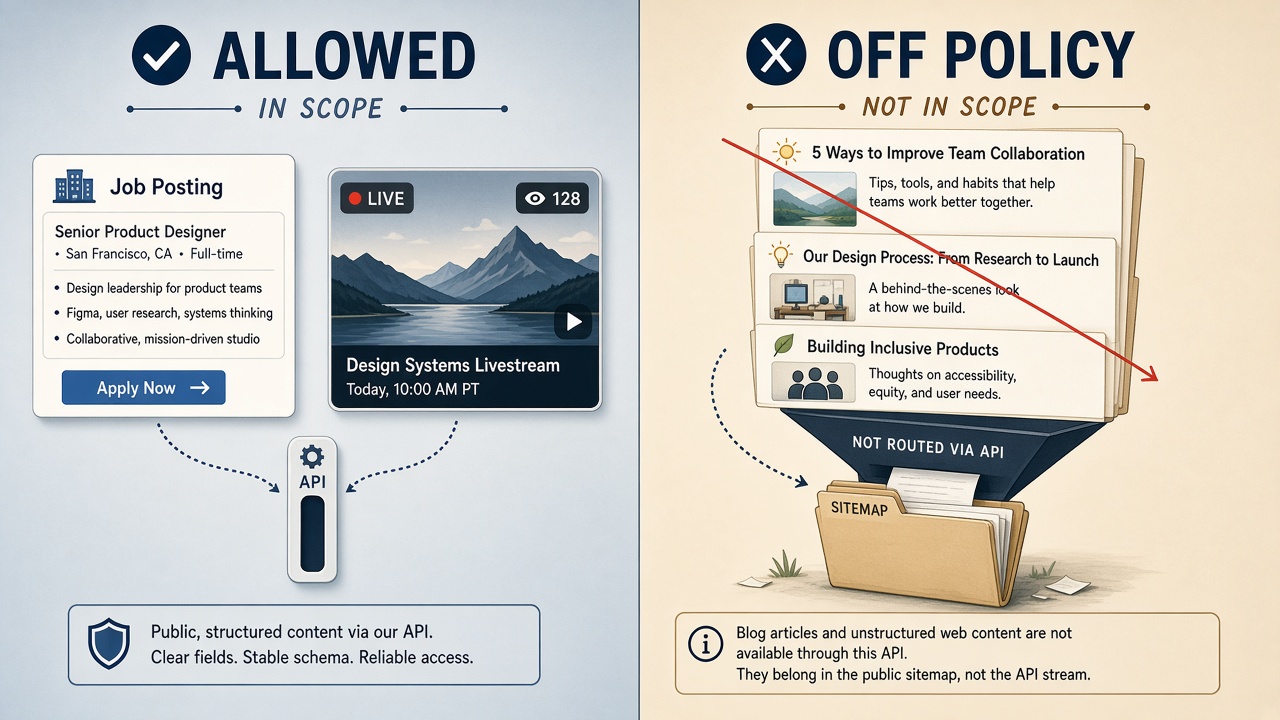
IndexNow does not reach Google, and the Google Indexing API is not the workaround. Google says that API can only be used to crawl pages with JobPosting markup, or a BroadcastEvent embedded in a VideoObject. Ordinary articles, guides, and autoblogged posts are off-policy, even when a plugin offers a one-click submit.
An automated SEO stack should refuse those article URLs on this API. They stay on the XML sitemap and in Search Console. A plugin toggle does not widen the allowed page types, and routing a blog post through a job or video endpoint does not make the call legitimate.
That daily publish quota covers both URL_UPDATED and URL_DELETED and resets at midnight Pacific Time. Use is free. The per-minute defaults sit beside it: 180 metadata requests and 380 requests across all endpoints. Hitting either ceiling is a reason to slow a legitimate job or livestream catalog, not a reason to send blog URLs anyway.
An Indexing API HTTP 200 means Google may try to recrawl the URL soon, not that the page is indexed. Batch calls can combine up to 100 requests in a single HTTP request, which only helps when every URL in the batch is an allowed type.
As of the October 16, 2026 documentation update, the quota-increase form was removed. That change does not turn the API into a general URL-submission service. A standard article still belongs on the sitemap plus Search Console, not on a larger quota for a tool that was never meant for it.
Off-policy — The Indexing API is only for JobPosting or BroadcastEvent-in-VideoObject pages. Article URLs stay on the sitemap and Search Console, no matter what a plugin button offers.
Indexing API Limits
How to Request Indexing in Search Console Without a Ranking Trick
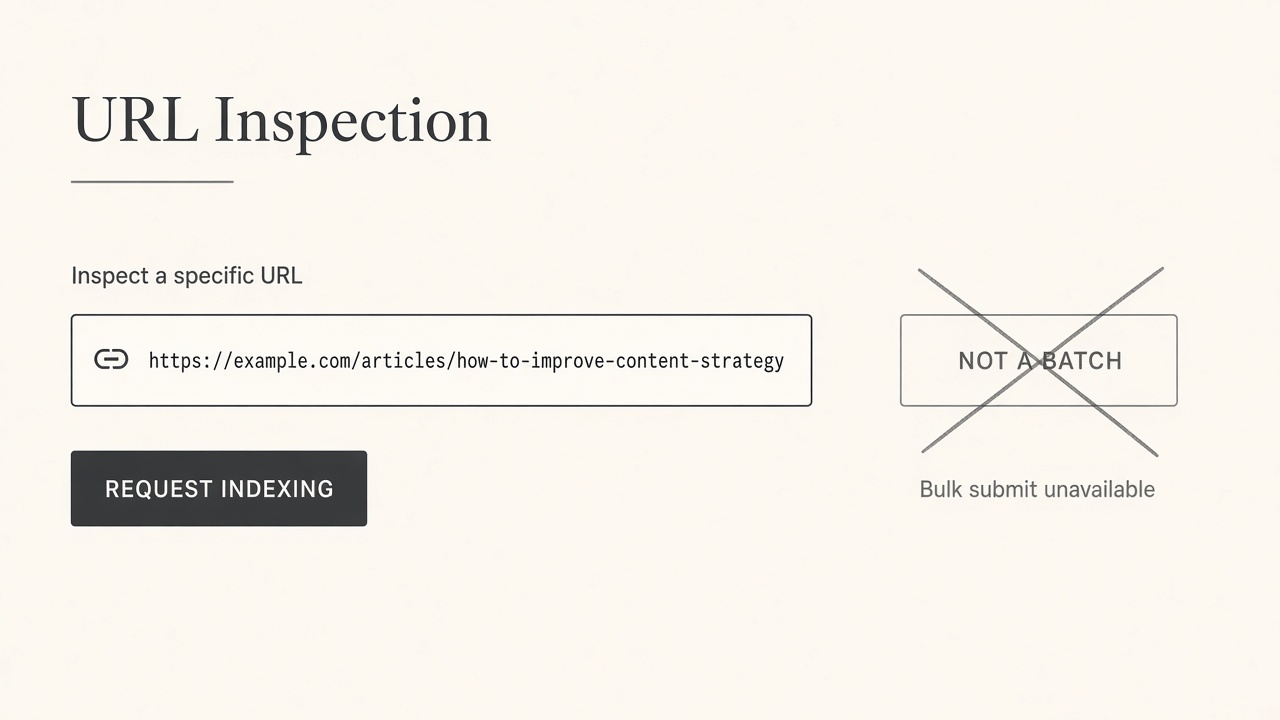
Search Console’s request indexing action is the remaining manual Google path for an ordinary article, and it is only a discovery nudge. Use it for a single URL that is already live, indexable, and self-canonical, when you need Google to notice a change the sitemap will also carry. It is not a ranking boost, not a stand-in for IndexNow, and not proof the page is indexed.
Open URL Inspection before you ask. If the page is noindex, points at the wrong canonical, or still behaves like a soft 404, fix that first. Requesting indexing on a blocked or confused URL just records the mistake.
Keep Google requests rare and manual. Do not script them, and do not queue the archive. For ordinary articles, the automated Google path remains a clean sitemap. The automated path for participating engines remains the gated IndexNow ping after a real add, meaningful update, redirect, or removal.
Nudge, not a trick — Request indexing only for one live, indexable, canonical URL when the sitemap already carries the change—never as a scripted ranking shortcut or an IndexNow substitute.
What the Publish Log Must Store So You Can Audit Every Ping
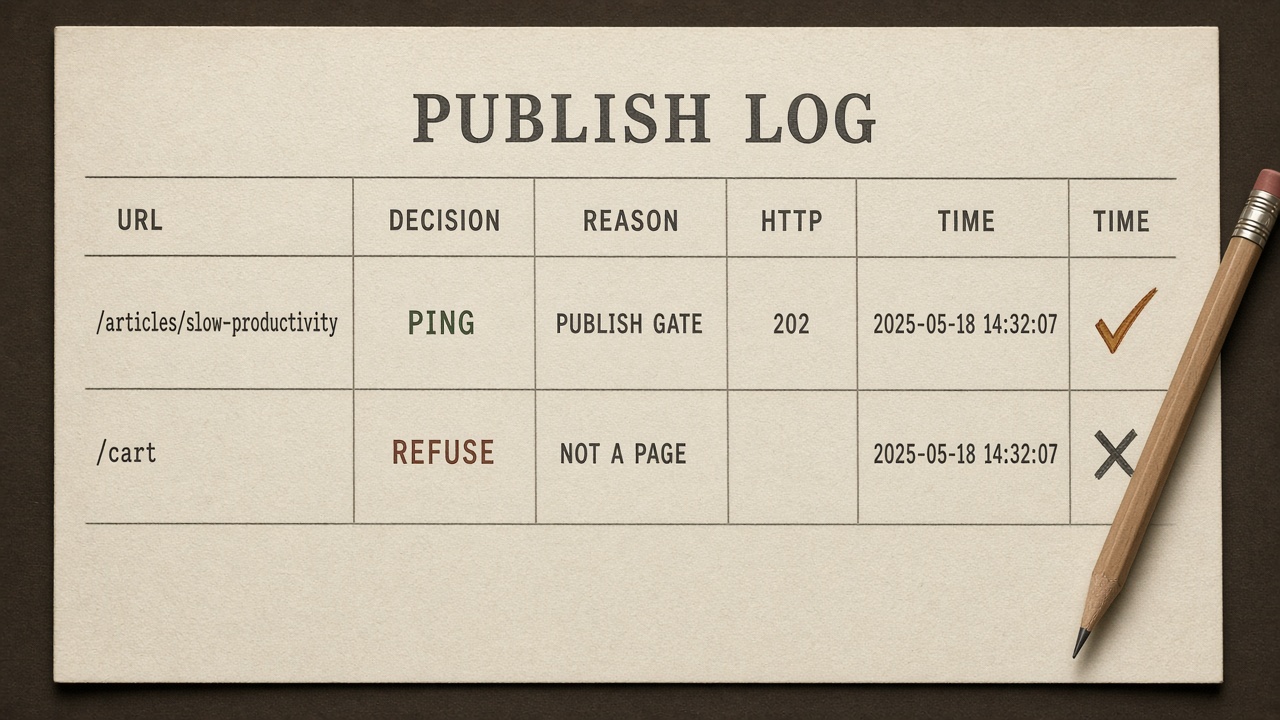
A week later, the only record that matters is one row per URL decision—not the plugin’s last-success badge. Store the timestamp, URL, canonical, revision or content hash, the decision (ping, hold, or refuse), and the reason code. That row is what a human opens when a page never appears in IndexNow Insights, and what monthly index-health reporting should join to submitted, crawled, and indexed counts.
What a ping row must include
When the decision is ping, also store the endpoint, HTTP status, a short response-body snippet, the batch id, and whether the URL was an add, update, redirect, or removal. If the live response was not 200, keep the redirect target or the final status code beside the ping so a later audit can tell a real removal from a soft 404 that was never sent.
What a hold or refuse must record
When the decision is hold or refuse, store the blocking gate: noindex, draft, empty review, thin page, unchanged body, or an off-policy Google Indexing API attempt. Never write a retry the contract forbade. The log should show why the URL was not sent, so operators fix the page instead of firing another ping.
Audit the row — One auditable row per URL—decision, reason, and for a real ping the status and change type—is the record that explains a missing crawl without treating IndexNow as an index button.
Key Takeaways
Wire the publish gate, key check, and one logged ping into your next live change so IndexNow fires only when the URL is actually ready.
Frequently Asked Questions
You Might Also Like
- Publishing Flows for SEO Publishing: What the Stack Automates vs What You Still Own
- Governance Publishing Governance Checklist Before an Automated Article Goes Live
- Measurement Content Operations KPIs: The Monthly Sheet for Automated Publishing
- Publishing What to Track in an SEO Editorial Calendar Besides Publish Dates
- Measurement SEO ROI for Automated Publishing: How to Prove the Stack Is Working