Content Operations KPIs: The Monthly Sheet for Automated Publishing

Automated publishing makes draft speed look like progress. The operating problem is finished work you can stand behind: briefs that clear review, pages that stay indexed, and a queue that does not outrun the hours available to edit. A content operations KPI sheet is the monthly record of that constraint, not a vanity count of posts shipped.
EasyContent groups content operations measurement into four areas—efficiency, quality, impact, and business value—and advises tracking only 8–10 metrics, reviewed each month with three questions: what worked, what did not, and what changes next. Volume alone fails that test. TeamBench’s warning is blunt: a machine that publishes 50 mediocre pieces a month is worth less than one that publishes 25 excellent ones. Pair published count with a quality gate, or the sheet will celebrate the wrong win.
This article is the one-page sheet for a solo automated stack. It covers planned versus published, median cycle time, work in progress, first-pass rate, revision rounds, edit ratio, post-publish corrections, indexed share, and refresh count—plus the rule that review capacity, not draft speed, sets the date. Outcome numbers such as impressions and clicks stay on a 90-day lag so a new URL is not judged before it has had time to rank.
- Track 8–10 content operations KPIs across efficiency, quality, impact, and business value, and review them monthly.
- Pair published count with a quality floor—pass rate, revision cycles, and edit ratio—so throughput cannot rise while standards fall.
- Finished capacity is the smallest stage limit; extra AI drafts do not raise output if review hours cannot clear the queue.
- Read Search Console and conversion outcomes on a 90-day lag; cycle time and first-pass quality move sooner.
- Treat published healthy ranges as calibration bands, not a quota, and hold the next publish when the floor is missed.
What a monthly content operations KPI sheet should include

A monthly content operations KPI sheet is a short operating set, not a click report and not a count of AI tools in use. Group it the way content operations measurement actually works: efficiency, quality, impact, and business value. The sheet asks whether the line can ship a page a human will stand behind, and it holds the next publish when the constrained stage misses.
That is a different question from a content marketing or SEO ROI metric. An operations KPI asks whether the page is fit to ship. An ROI metric asks whether that page earned demand. Keep proof of return on the existing SEO ROI article, and keep production gates on the autoblogging KPI one-pager. This sheet does not rebuild either scorecard.
Columns you can copy each month
- Planned versus published
- Median cycle time
- Work in progress
- First-pass rate
- Average revision rounds
- Edit or rewrite rate
- Post-publish corrections
- Indexed share
- Refresh count
- One bottleneck sentence
Do not treat AI adoption as a productivity KPI. In a 2026 study of more than 1,200 content marketers, 74% used AI tools, yet only 19% tracked AI-specific KPIs, and 81% still used the KPIs they had before AI. Tool use is not a measured line, so it never earns a column on this sheet.
Leave withdrawn benchmark tables off the sheet. Headcount by revenue, approval-time comparisons, cost reductions, and client telemetry were pulled on October 4, 2026 because the evidence could not be verified. Read the real columns with three questions: what worked, what failed, and what changes next month. Cycle time, first-pass quality, post-publish corrections, and refresh count move before search outcomes, so keep impressions, clicks, and assisted conversions on a longer lag and do not score a new URL too early.
The sheet — A useful monthly sheet is a short set across efficiency, quality, impact, and business value, with a quality gate beside throughput and no room for unverified benchmarks or an AI-adoption count.
A healthy brief-to-publish time on a one-person stack

For a one-person automated stack, calibrate median cycle time at 3–5 days from brief approval to publish, with finished output around 1–3 posts a week. Digital Applied’s 2026 productivity panel sets those solo-operator bands. They are calibration marks, not a quota the sheet is supposed to beat.
State the rest of that band once, so later reviews can point back to it: a quality composite of 80 or better, and an edit ratio under 35%. Clock the median from brief approval, not from the first draft. Generation is the cheap stage. If the quality composite or the edit ratio slips while the clock still looks fine, the calendar is moving faster than the work can stand.
Draft speed is not capacity
Do not import a staffed-team service level onto a solo stack. A larger desk can split briefing, drafting, and review across people; one operator cannot. If review hours cannot stand behind the piece, the calendar date stays open. That is the rule the one-person content calendar template is built around. Extra drafts do not raise finished output when review is already the constrained stage.
A week inside the band is a note, not a miss. A cycle that keeps stretching is a stage-limit problem. Fix it by refusing dates you cannot review, not by generating more drafts and hoping the queue clears itself. The next publish waits until the constrained stage can actually hold the piece.
How to measure throughput without rewarding thin pages

Count only finished, gated publishes, and print a quality floor on the same row as the count. A pile of outlines and tool runs can look busy while nothing a reader should see has shipped, and those do not count as throughput.
Read the quality columns in the same month the count rises. If first-pass rate falls, edit ratio climbs, or post-publish corrections worsen, quality is dropping—freeze the quota before the next brief is dated. Thin pages that clear a calendar are not throughput.
Finished capacity is the smallest stage
Digital Applied’s capacity example makes the constraint concrete, and it is a worked illustration, not a benchmark to copy. Two hundred forty hours at ten hours an article imply 24 pieces. Thirty-two editor hours at two hours each support only 16. The team-wide 24-article figure therefore overstates finished capacity. Extra AI drafts do not raise output when review is the tight stage; they only lengthen the queue the sheet already refused to date.
When the queue outruns review, log the blocked stage, the hours available, and the dates refused. Do not count drafts, outlines, or tool runs as throughput. The monthly number is gated publishes that still clear the quality floor—not how fast the draft side can generate more work the constrained stage cannot finish.
Same-row floor — Throughput is finished, gated publishes with a quality floor on the same row. If that floor slips as the count rises, freeze the quota; finished capacity is the smallest stage, not draft speed.
What first-submission pass rate means the brief is clear

Once a rising publish count is allowed only if the quality floor holds, the number that tells you whether the brief was clear is first-submission pass rate: the share of pieces that clear review on the first handoff, with no rewrite cycle. A miss here is a brief problem, not a reason to generate another draft against the same date.
Read the two published floors as separate instruments, not as one blended target. TeamBench treats a healthy first-submission pass rate as above 60%, with revision cycles under 2 and review turnaround under 48 hours. That 48-hour window is TeamBench’s published range. It is not a reason for a solo operator to rubber-stamp a piece that review cannot stand behind.
A mature automated line uses a stricter definition. Oleno counts a pass only when the first submission scores 85 or higher, and publishes a healthy band of 85 to 92 percent, with an alert below 80, calculated on a 28-day rolling window. Do not average 60 percent and 85 percent into a compromise KPI. One is TeamBench’s operating floor; the other is Oleno’s scoring rule for an autonomous line.
When a falling rate means stop, not rewrite
On a one-person stack, a falling first-submission pass rate means the brief is unclear. Revision cycles should stay under 2. A third revision round stops the line: fix the brief or kill the URL. Do not keep the date and hope the next draft lands. Log the blocked stage the same way you already log a refused publish date, so next month’s sheet shows a brief failure rather than a mysterious slowdown.
Clear brief — First-submission pass rate is the share that clears on the first handoff. Keep TeamBench’s floor above 60% and Oleno’s scoring rule (85 or higher, alert below 80) separate, and treat a third revision as a stop: fix the brief or kill the URL.
Edit ratio: when a high rewrite rate means the brief failed

Edit ratio is the share of a draft a human rewrites before publish. A high ratio is a brief or tool failure, not proof the operator should publish more to compensate. First-pass rate already showed whether the piece cleared review on the first handoff. Edit ratio shows how much of that draft still had to be rebuilt in the editor’s hands.
Read the ratio as a diagnosis, not a quota
Digital Applied’s productivity guide, which sets the solo edit-ratio band under 35%, also reads severity inside the ratio. Under 25% is healthy. From 25% to 50% the brief has a gap: the draft is usable, but the editor is filling in what the assignment never specified. Over 50% is a full rewrite—the line is producing first drafts the editor has to rebuild—so fix the brief, not the quota. A ratio still under 35% can clear the solo gate and still show a brief gap worth fixing. The same guidance treats cycle time above 14 days as a structural problem. Send that miss back to the cycle-time row. Do not answer it by generating more drafts.
The AI revision band is a different signal
For AI-assisted drafts, a human revision target of 25% to 40% is the working band. Above 60% signals a prompt or tool mismatch. Below 15% may mean too little human oversight, so a very low ratio is not automatically a win. Do not average that band with the solo calibration already on the sheet, and do not treat a thin edit as permission to skip the quality floor.
Which quality score should block publish
TeamBench’s quality ranges require an average score above 75 out of 100, no dimension below 60, and a post-publish error rate under 5%. If the sheet already committed to the stricter solo composite of 80 or higher, use that committed number. Do not blend the two floors into a softer average, and do not ship a URL to catch errors after it is live. A miss on this gate holds the next publish the same way a blocked review stage does.
Hold the date — A high edit ratio means the brief or the tool failed—fix that, and hold the date. Publish only when the floor already on the sheet is met: TeamBench’s average above 75/100 with no dimension under 60 and errors under 5%, or the solo composite of 80+ if that is the number you committed to.
How often to review content operations KPIs

Review the operating set monthly, not daily. Once a miss on the constrained stage has already held the next publish, another morning glance at the same row will not change the decision. Keep the sheet to 8–10 metrics that truly matter, and close the month with three questions: what worked, what did not, and what changes next month.
Split the cadence by how fast each signal can move. Weekly review covers volume and cycle time—the constrained stage, not a fresh draft count. Quality is a monthly read. Outcomes are quarterly, and outcome KPIs need a 90-day lag before they read true, so a new URL is not judged in its publish month.
The monthly sheet holds the leading signals: cycle time, first-pass rate, revision rounds, edit ratio, post-publish corrections, indexed share, and refresh count. Impressions, clicks, and assisted conversions stay on the 90-day tab. Send the outcome math to the existing SEO ROI article rather than turning this sheet into a second scorecard.
Monthly, not daily — Review 8–10 operating metrics once a month, keep weekly checks to volume and cycle time, and read impressions, clicks, and assisted conversions only after a 90-day lag.
How to track indexation and refresh count next to new publishes
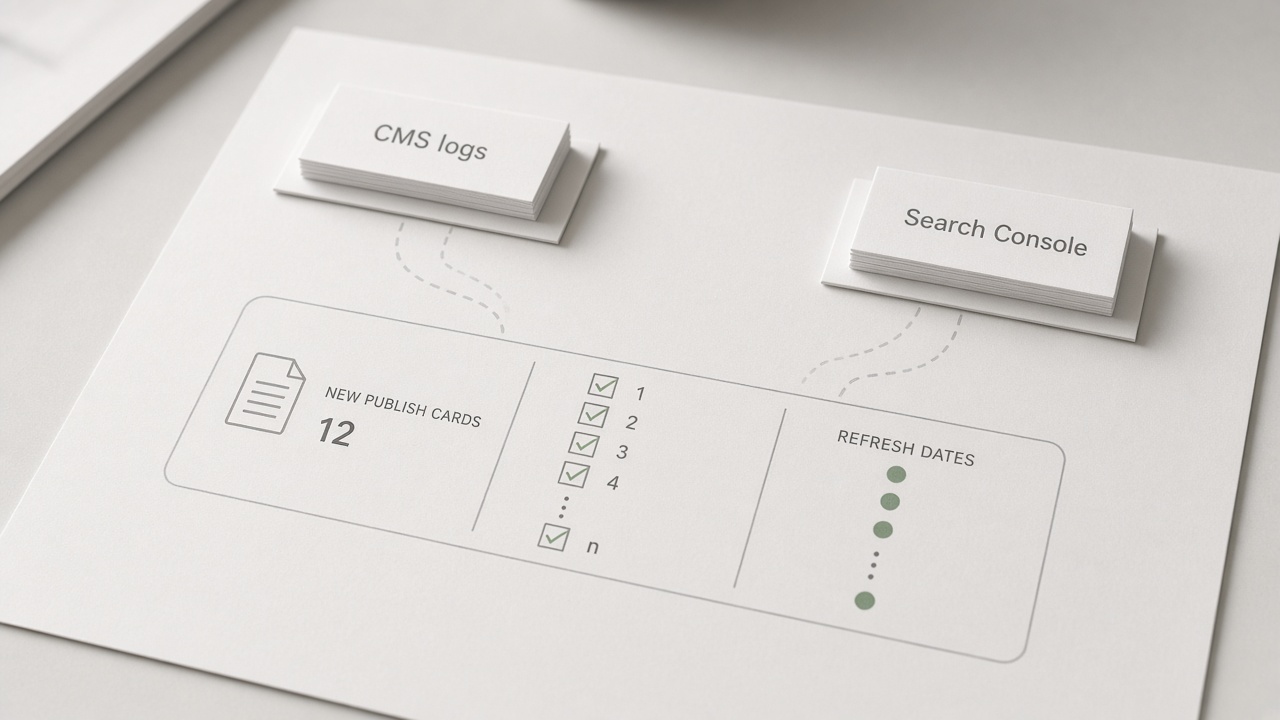
Those monthly columns only work if indexed share and refresh count sit on the same view as new publishes. Growth is not a net-new URL count. A month that ships a full slate of new pages, refreshes nothing, and watches a smaller share of the library stay indexed is not a throughput win—it is a library that is getting longer while the searchable part thins out.
Click Laboratory’s starter content dashboard reviews Search Console impressions, clicks, CTR, and average position monthly on a 90-day window, and treats indexed URL share and content freshness as quarterly checks. That monthly look is still a trailing window, not a verdict on a URL published this week, so it does not pull impressions and clicks onto this sheet’s monthly hold line. The outcome tab stays on the 90-day lag. Still log indexed URLs over URLs you intended to be live, and refreshes actually shipped, so the quarterly check is a confirmation, not a surprise.
What feeds the sheet
- CMS logs feed planned versus published, timestamps, revision rounds, and post-publish corrections. That is the operating row.
- Search Console feeds indexation and the query window: impressions, clicks, CTR, and average position, read monthly across 90 days.
- GA4 feeds only the 90-day assisted-conversion tab. It does not belong on the monthly hold line.
GA4 must not delay a hold. If the CMS log says the quality floor failed—first-pass, edit ratio, or post-publish corrections—the next publish waits even when analytics have not updated. Search Console can explain whether last quarter’s URLs earned a place in results. It cannot clear a piece the review log already refused.
Same row — Indexed share and refresh count travel with new publishes on the monthly sheet; a failed quality floor holds the next publish before Search Console or GA4 can confirm anything.
What a solo operator should automate—and when a miss holds the next publish

Those same logs are what a solo operator should automate—and nothing past them. Pull publish timestamps, revision counts, index status, and refresh dates so the monthly row fills without a hunt through the CMS. Do not automate the judgment those fields support. A script can flag that a piece missed the floor; it cannot decide the floor was the right one, or that the next URL should wait.
Four signatures stay human: the brief, the quality block, the ship-or-hold decision, and the one bottleneck sentence. Fieldwork is why that signature does not move to a tool. CMI and MarketingProfs surveyed 1,015 B2B marketers from June 24 to August 14, 2025, and found that 95% of organizations used AI-powered applications. Among marketers using AI for content creation, 58% said quality improved and 12% said it decreased, while 68% were still in exploratory or developing stages. AI use is not a pass. The plain-English definition of content automation already says what stays human; this sheet only requires the signature, and does not restate that playbook.
A missed quality KPI holds the next publish. First-pass rate, edit ratio, the quality block already committed on the sheet, or review capacity that cannot stand behind the piece all freeze the date. Do not raise the quota to catch up. A slow week still inside the cycle-time band is a note on the bottleneck line, not a freeze, unless the slip becomes structural or it starves the hours review actually has. The constrained stage keeps the gate, and finished output moves only after that human sign-off is real.
Hold the date — Automate the data pulls. A human still signs the brief, the quality block, ship-or-hold, and the bottleneck sentence—and a quality miss freezes the next publish instead of raising the quota.
Key Takeaways
Copy the monthly columns onto one sheet this week, sign the quality floor, and let the next miss hold the next publish.
Frequently Asked Questions
You Might Also Like
- Measurement SEO ROI for Automated Publishing: How to Prove the Stack Is Working
- Measurement KPIs for an Autoblogging System: What to Report Monthly
- Measurement Content Decay Audit: A Monthly Checklist Before Rankings Slip
- Measurement How to Prioritize a Content Decay Audit When You Publish Weekly
- Measurement Search Console for Content Ops: Queries That Should Become Briefs