llms.txt Generator: How to Help AI Crawlers Cite Your Site

Search is no longer only ten blue links. Answer engines and AI crawlers pull passages, summarize them, and decide whom to name. If your best work is buried in a generic sitemap or blocked by default crawl habits, those systems may never see the pages you actually want cited.
An llms.txt file is a small, human-and-machine-readable map at the root of your site: which URLs matter, how they cluster, and what each cluster is for. A generator’s job is not to invent a second robots.txt. It is to turn the structure you already use—hubs, spokes, canonical answers—into that map so crawlers can prefer your intended sources.
This article walks through what belongs in the file, how generators should read clusters rather than scrape everything, and how to keep the file evergreen as you publish. The goal is practical: more accurate citations of your pages when models answer questions in your space.
- llms.txt is a citation map for AI crawlers, not a replacement for robots.txt or sitemaps.
- A good generator encodes content clusters and canonical pages, not a dump of every URL.
- Answer engines use the file to find trusted sources; weak or noisy maps get ignored.
- Keep the file aligned with live hubs and spokes so citations stay accurate over time.
- GEO and AEO work together: structure for humans first, then expose that structure to models.
What llms.txt actually is (and what it is not)
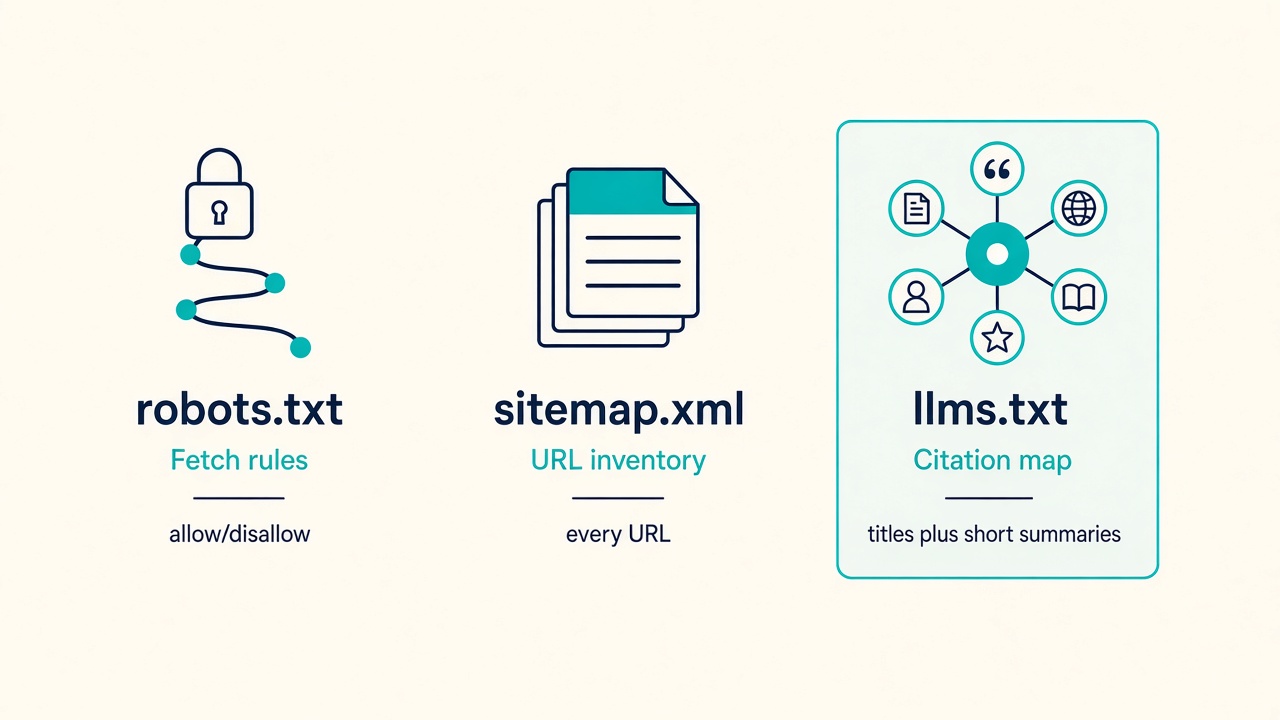
That distinction matters more than the filename. An llms.txt file is a human-readable, root-level hint that points models and AI crawlers at the pages you actually want quoted—with enough context that a citation can land on the right URL. It is not a ratified internet standard. Nothing in the stack guarantees that every answer engine will fetch it, parse it, or obey it. Treat it as a clear nomination of citable sources, not as a contract.
Those jobs already belong to other files, and mixing them up is how teams waste the format. robots.txt governs fetch permission: what a crawler may request. A sitemap lists indexable URLs at scale so search systems can discover the catalog. llms.txt does neither. It nominates a smaller set of sources and attaches the cluster, canonical, and short abstract that make a quote attributable. When you paste Allow and Disallow walls into llms.txt, you spend the file on permission syntax the crawler already has—and you can bury the very pages you hoped would be cited.
A generator should compile your content system, not invent boilerplate
That is why a useful llms.txt generator is a compiler, not a wizard. It should take the clusters you already publish, the canonicals you already enforce, and the short abstracts that describe what each page is for—and emit a citation map. It should not scrape every URL on the domain, copy robots.txt, or fill the file with generic “welcome to our site” copy. If the output does not reflect how you actually organize expertise, answer engines have nothing trustworthy to quote.
The broader layer—how you structure entities, evidence, and visibility across answer engines—belongs in a GEO playbook. This article stays on the file itself and on the generator workflow that turns real content architecture into that map.
Citation map, not crawl rules — llms.txt is a voluntary citation map of your best pages with context. A generator earns its keep only when it compiles clusters and canonicals—not when it clones robots.txt or dumps the whole site.
Why answer engines still miss the page you actually want cited
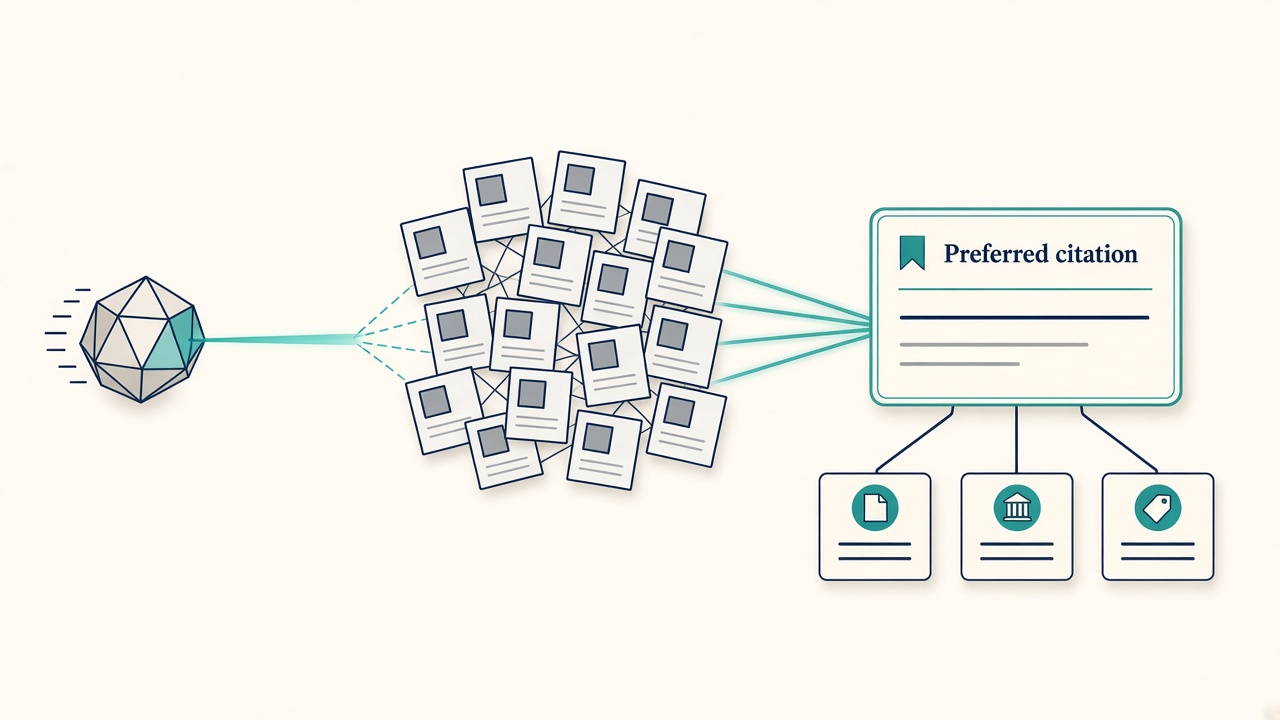
Crawlability and classic rankings still leave answer engines guessing which URL is the source of record. A bot can fetch your site, a search engine can rank a cluster, and a model can still quote a thin archive, an old campaign landing page, or a homepage that never states the claim in a form worth attributing. Permission to fetch is not a map of what should be cited.
Generators fail in predictable ways when they treat the file like a dump or a shortcut. Listing every URL recreates the sitemap problem: no hierarchy, no preferred canonical, no reason to trust one hub over another. Listing only the homepage tells the crawler almost nothing about your definition pages, comparison guides, or how-to sequences. Pointing at category archives and tag indexes is worse—those pages are usually thin, duplicated, and weak as extractable answers. The file should nominate clusters you actually want attributed, not every path that happens to exist.
AI visibility still depends on the destination page. llms.txt nominates; the page has to be quotable. If the hub you list does not open with a clear claim, original examples, and a self-contained explanation, models have little to extract even when they follow the hint. On-page citation tactics—titles, lead answers, entity clarity—belong with a ChatGPT visibility checklist, not in this file. Keep llms.txt focused on crawler guidance: which URLs, which cluster they represent, and a short abstract of why they are the source of record.
Treat the file as one answer-engine optimization signal among others—entities, freshness, original examples—not a ranking hack. It is useful when it reduces ambiguity about which page owns a topic. It is useless when it copies robots.txt syntax, inflates URL count, or pretends a generator can substitute for pages that cannot be cited.
Ambiguity, not access — llms.txt helps only when it names your real hubs; crawlable URLs and thin listings still leave answer engines guessing the source of record.
What a useful llms.txt file actually contains
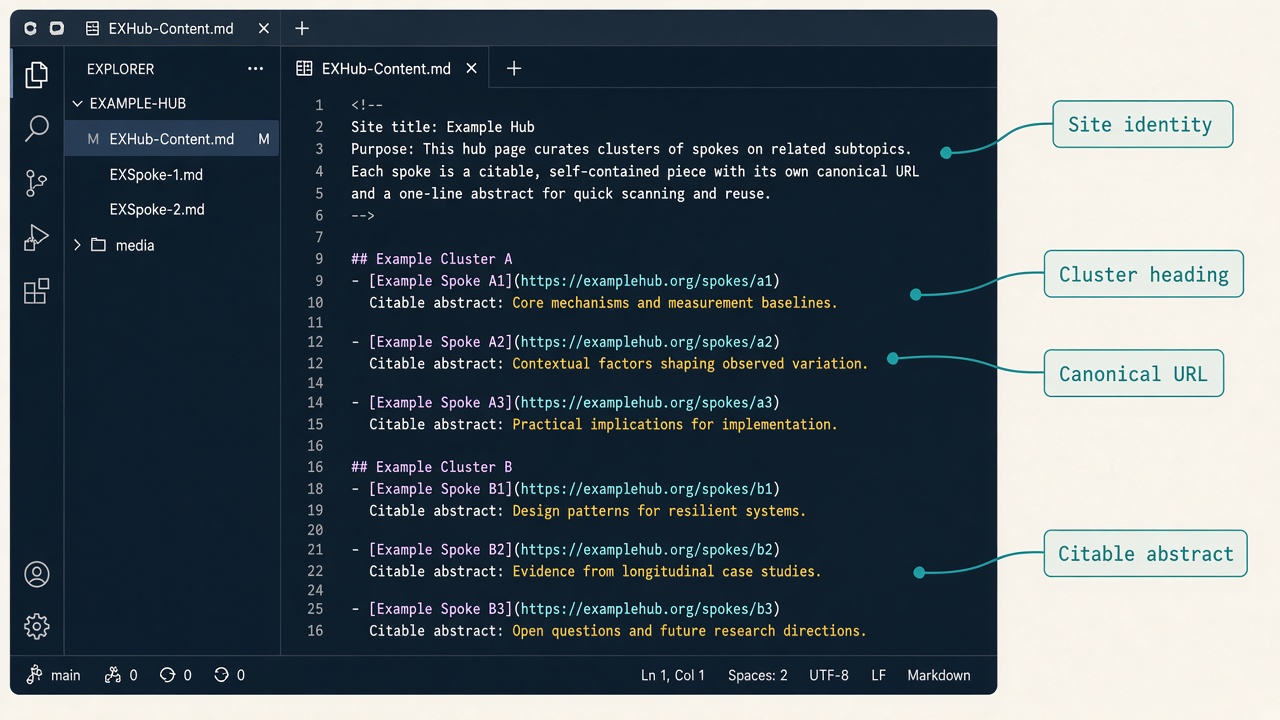
That nomination only works if the file itself is easy to parse as a map of sources, not as a dump of paths. A generator earns its keep when it compiles a short, Markdown-shaped document that a model can skim the way a human editor would: site identity first, then a handful of topic clusters, each pointing at the pages you actually want quoted.
Start with a single H1 that is the site name, not a slogan. Follow it with a short paragraph that states what the site is for—who it serves and what it is an authority on. An optional line for a contact, about, or policy URL is enough when it helps a crawler confirm who publishes the work. Then use H2 headings for each content cluster you care about: one section per theme, not one section per URL.
URLs plus abstracts, not titles alone
Under each cluster, list canonical HTTPS URLs. Pair every URL with a one- or two-sentence abstract that matches the live page: what the article actually argues, defines, or demonstrates. Do not stuff keywords. Do not claim findings, data, or guarantees the page does not support. The abstract is a citation hint, not a second meta description. If the page is a definition, say so. If it is original research or a complete how-to, say that in plain language.
Prefer hubs, original research, glossary-style definitions, and full how-tos—pages that can stand as the source of record. Leave out tag indexes, on-site search results, paginated archives, UTM and tracking copies, and gated app routes. Those URLs clutter the map and train a model to treat noise as equivalent to your best work.
Keep it skim-friendly
Dozens of best sources beat thousands of URLs that merely duplicate the sitemap. If a cluster has five strong canonicals, list those five. Optional extras—a changelog, a preferred citation name, a language note—belong only when they reduce ambiguity (two similarly named products, a translated site, a renamed brand). They are not decoration, and stuffing them in does not make the file look more “complete.”
Core shape — A generator should output a cluster map of canonical URLs plus faithful abstracts—not a second sitemap and not robots.txt syntax.
Generate llms.txt from your cluster map, not a URL dump
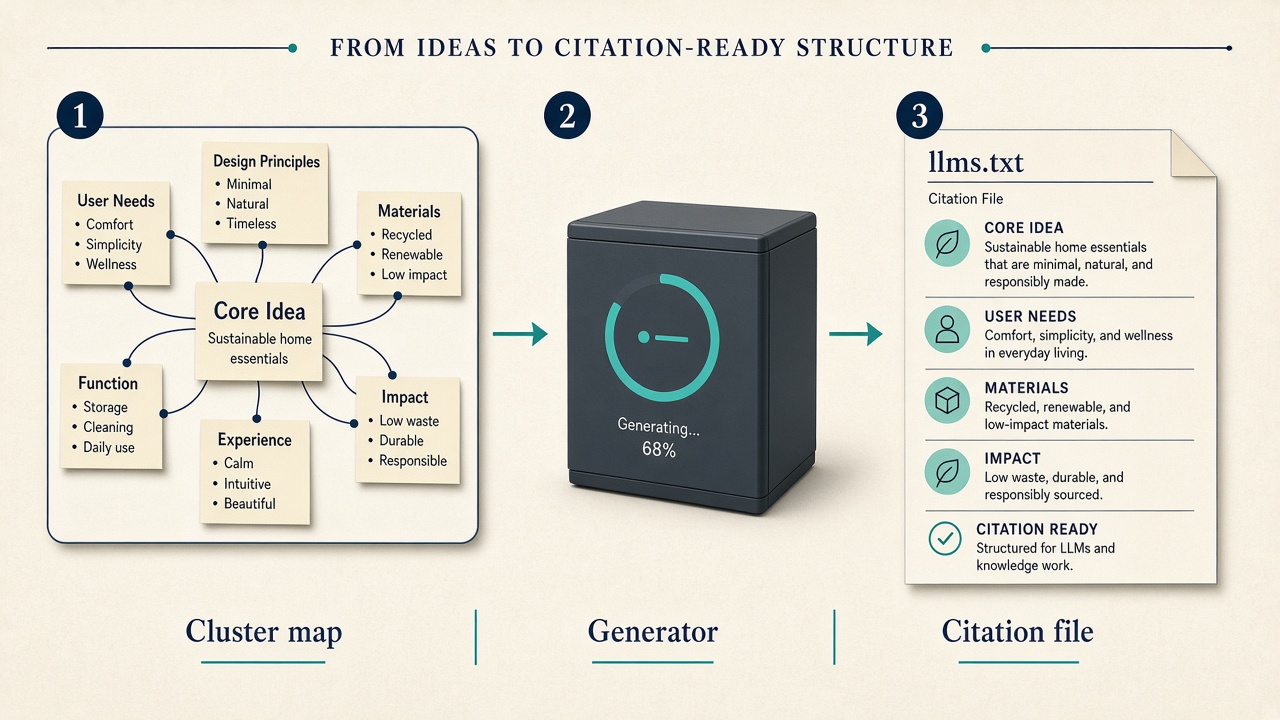
Once you know the file should list hubs and abstracts rather than every crawlable path, the generator’s job is mechanical: compile a citation map from the same cluster map you already use for internal linking. That map is the source of truth. Each topic gets one hub URL, the supporting spokes that actually carry original answers, and a single canonical per search intent. Duplicate intents, parameter variants, and “also related” pages stay off the list.
Not every page in a cluster deserves a nomination. Before a URL is written into llms.txt, it has to clear a citability bar: a clear definition or direct answer near the top, named entities an answer engine can hang a quote on, original examples or data rather than restated consensus, a stable canonical HTTPS URL, and a visible last-updated date so the model is not citing a stale draft. Thin category archives and tag indexes fail that test even when they rank.
How the generator should compile the file
A useful generator is not a one-click empty template. It is wired to briefs and the publishing queue so new hubs and changed canonicals flow into the file at the same moment you update internal links—not as a quarterly cleanup. Autoblogging pipelines can emit this file as a side effect of publishing; the file is still only as good as the cluster map and the citability filter behind it.
The contrast is simple. An empty template produces a file that looks official and cites nothing worth attributing. A generator bound to clusters, briefs, and the queue produces a short, current map of the pages you actually want quoted.
Compile, don’t dump — Treat llms.txt as a compiled export of your cluster map and citability filter, regenerated whenever hubs or canonicals change—not as a static robots-style file you fill once.
Where to host llms.txt so crawlers actually find it
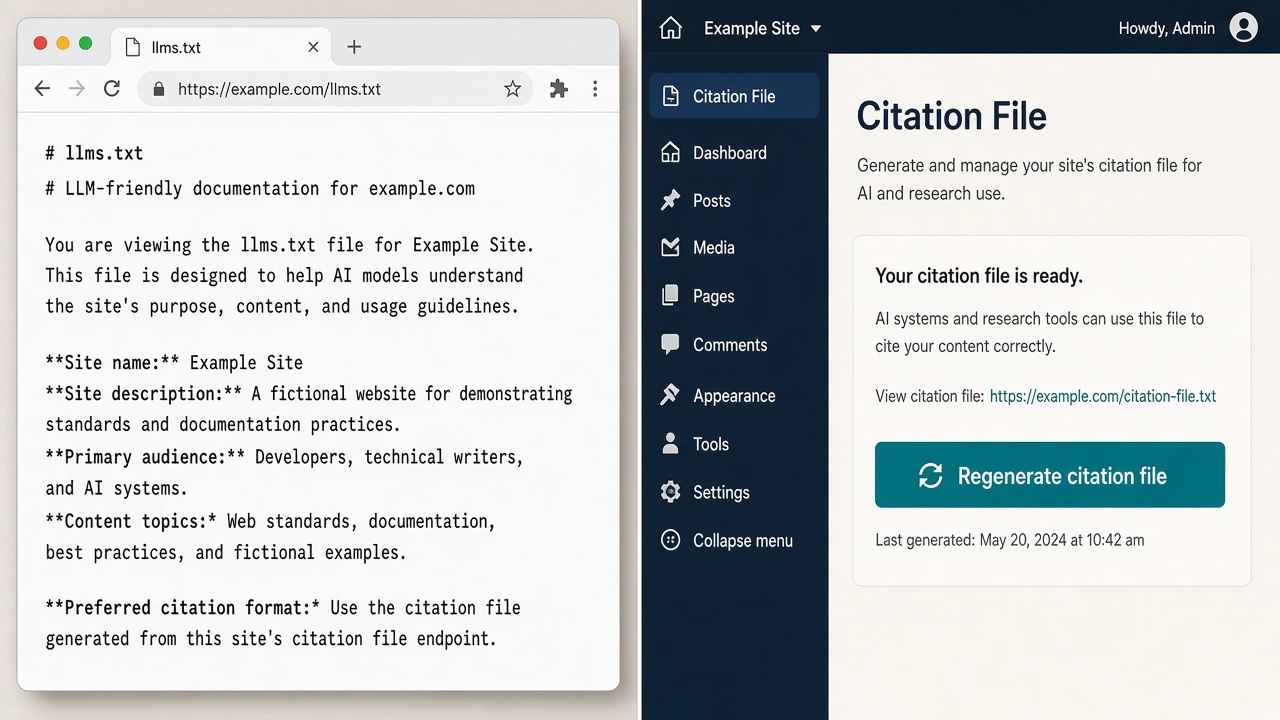
Once the file is compiled from your cluster map, it only helps if answer engines can fetch it without guessing. Serve it at the site root as https://yourdomain.com/llms.txt—plain text or Markdown-friendly text, uncompressed, publicly cacheable, and never behind a login. That path is the convention crawlers look for first; a nested media URL or a campaign landing page is not a substitute.
Confirm robots.txt does not Disallow the file itself, and that the request is not redirected through a marketing splash, cookie wall, or geo-block. A 301 to www or apex is fine only if every URL inside the file uses that same canonical host. Mixed hosts make the nomination look untrustworthy even when the Markdown is perfect.
WordPress, static, and headless without competing copies
On WordPress, pick one delivery path and stick to it: a committed static file in the web root, a small must-use plugin or theme route that prints the generated Markdown, or a host-level rewrite from a media attachment if that is the only write access you have. Do not let five SEO plugins each claim to write llms.txt; overlapping files race on deploy and you cannot tell which version a crawler saw. Headless and static sites should emit llms.txt in the same build that writes the sitemap so listed URLs never drift from what just shipped.
After deploy, fetch the live URL yourself. Check that the response is the file, not HTML; that the host matches your canonicals (www versus apex); and that every listed link returns 200 to the intended page, not a tag archive or a login. That verification is the last mile of the generator—not a quarterly audit, but the same check you already run when internal links change.
Root, one file — Host one uncompressed root file at /llms.txt, keep it unblocked and on the canonical host, and ship it in the same deploy as your sitemap so crawlers never chase a stale or competing copy.
Quality gates, common mistakes, and when to regenerate
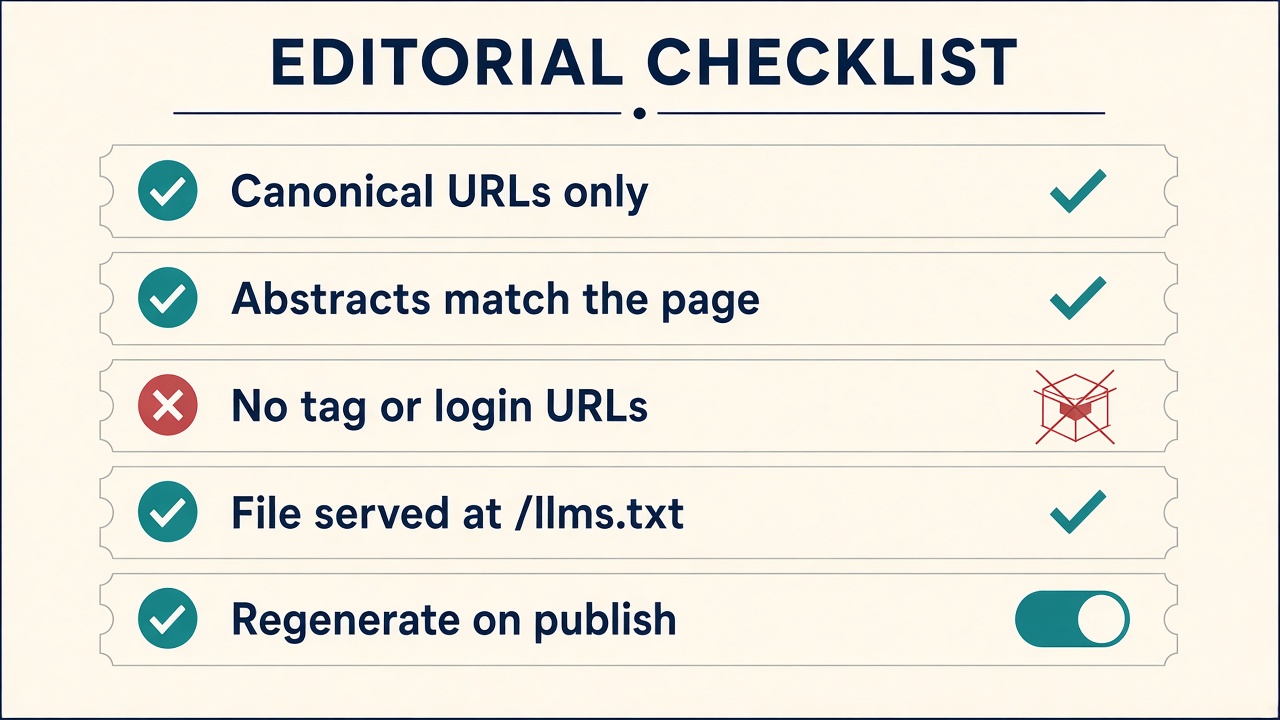
Once the file is live at the root, the remaining work is quality control. A crawler that finds llms.txt still has to decide whether the nominated pages are worth quoting. The generator only helps if every line would still be true if someone opened the URL today.
Mistakes that undo the map
The most common failure is stuffing the file with permission syntax or a dump of every post because “more coverage” feels safer. Equally weak is listing only commercial landers with no extractable answer, or writing abstracts that advertise a different page than the one at the URL. Broken links, 301s, and UTM copies belong nowhere in this file. Each of those signals tells an answer engine you have not named a source of record.
A short QA pass before you publish
- Every URL is unique, canonical, HTTPS, and returns 200.
- Each abstract is factual, matches the live intro, and stays around forty words.
- Cluster headings use the language people actually ask in, not internal taxonomy.
- The whole file stays human-skimmable—dozens of best sources, not a sitemap clone.
Regenerate when a hub is rewritten, when two articles merge into one canonical, or when you retire a URL that was previously nominated. Do not promise citations. The file reduces ambiguity for engines that choose to use it; it is not a ranking switch. If the live pages are thin, fix the content system first. A generator cannot launder unquotable posts into AI visibility.
Bottom line — Use llms.txt as a citation map of your strongest, current hubs—not a robots clone or a URL dump—and refresh it whenever those hubs change.
Key Takeaways
Map your clusters, compile a real llms.txt from your strongest canonical pages, and put it at the site root so answer engines can find and attribute the work you actually want cited.
Frequently Asked Questions
You Might Also Like
- AEO Answer Engine Optimization (AEO): How to Get Cited by AI Search
- AEO AI Visibility Checker: How to Audit Whether AI Engines Cite You
- AEO How to Get Cited by ChatGPT: A Practical Visibility Checklist
- Strategy GEO Optimization: How to Optimize Content for Generative Engines
- AEO What Is Generative Engine Optimization (GEO)? The 2026 Playbook