Internal Linking Tool: What to Automate vs What to Review

Internal linking tools promise scale: crawl the site, match topics, drop anchors, ship thousands of links. That only works if you treat automation as a drafting layer, not a publisher. The pages that make money, rank as pillars, or exist as thin programmatic templates are exactly where a bad insert costs more than the time you saved.
Readers looking for an internal linking tool usually want two things at once: speed on a large catalog, and protection against junk or risky links. The useful split is operational, not philosophical. Automate discovery, candidate matching, and bulk application on safe content types. Keep a human in the loop wherever intent, conversion, or uniqueness is on the line.
This article stays evergreen by focusing on what belongs in each bucket—not a vendor list that goes stale. Use it as the rule set you apply whether you run a CMS plugin, a custom script, or an SEO suite.
- Automate crawl, topic matching, and bulk links on informational and high-volume catalog pages.
- Review every candidate that points to or from money pages, thin programmatic URLs, or unique pillars.
- Treat the tool as a draft queue: approve, reject, or rewrite anchors before publish.
- Scale volume without letting templates insert links that dilute uniqueness or conversion paths.
- Human review is cheaper than recovering rankings or revenue after a bad internal-link blast.
Why volume-first linking tools fail without review gates

If you run a lean team that already publishes at scale—or you are about to plug an internal linking tool into that machine—the failure mode is rarely “not enough suggestions.” It is too many inserts with too little judgment. Tools are built to maximize crawl coverage, candidate volume, and how often a link actually lands on the page. Rankings and conversions do not care about that scoreboard. They care whether the anchor is accurate, whether two URLs keep pointing at each other, and whether a hub that should collect related intent is instead siphoning it into a lookalike page.
That is the quality gate this piece owns. How you productize discovery, matching, and bulk insert belongs in a pipeline playbook. What to automate first across the rest of SEO belongs in a broader automation map. Here the failure is operational: the tool keeps scoring coverage while the site loses a clean hub, a conversion path, or a unique template.
Programmatic templates make a bad rule expensive. One sloppy match pattern does not create one bad link; it stamps the same mistake across every location, SKU, or query variant the template generates. Pillars and money pages concentrate the opposite risk: commercial intent, brand language, and conversion paths. A circular pair, a vague “learn more,” or a link that cannibalizes a hub does more damage there than on a low-stakes supporting article.
Optimize the tool for graph clarity, not for how often a candidate becomes HTML. A template that stamps one bad match, or a money page that loses a conversion step, will not show up on an insert-rate dashboard until rankings or revenue have already moved.
The gate — Let the tool draft high-volume, low-risk links from crawl data and templates; keep humans on anything that edits money pages, pillars, or thin programmatic URLs.
What an internal linking tool should actually automate
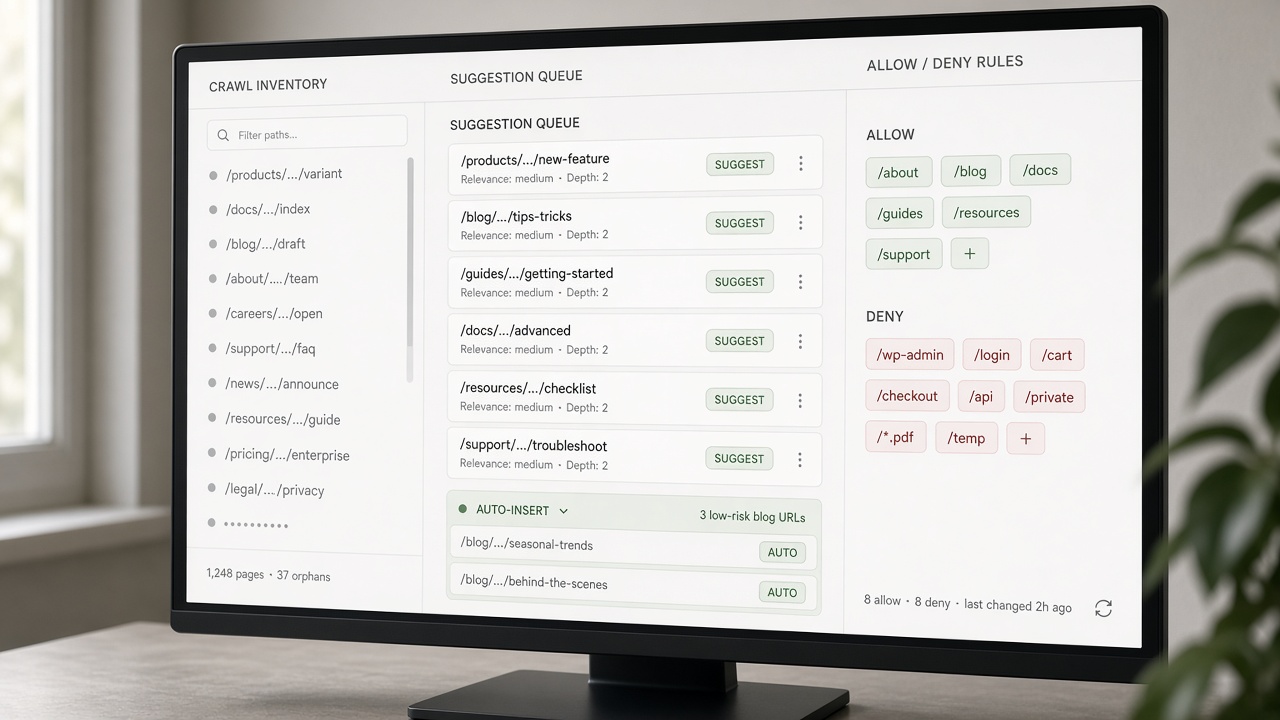
Once you treat volume as a risk, the useful question is not “what can the tool insert?” but “what can it prepare without guessing at strategy?” The right automation layer does inventory, matching, and housekeeping. It drafts links where a template already names a safe destination. It does not silently rewrite the pages that carry conversion, authority, or unique programmatic copy.
Crawl and inventory first
Start with a live map of published URLs, not a spreadsheet of hoped-for pages. A linking tool should recrawl what is actually live, detect orphans, and find pages that never point to the hub they belong to. Opportunities then queue by template—blog post to category hub, guide to glossary, comparison to product family—so operators review classes of links instead of one-off hunts.
Match candidates; do not judge them
Matching is pattern work. Related-URL candidates, keyword-to-URL maps, and flags for exact versus partial match belong in the machine. So do exclude lists: noindex, thin, expired, legal, login, and cart URLs should never enter the queue. Judgment—whether this sentence should carry that hub, whether the anchor steals a ranking page—stays with a person. The tool’s job is a ranked draft with those flags visible, not a silent insert.
Choose software by the job—inventory, match, housekeeping, gated draft—not by feature count. For that comparison, see Best SEO Automation Tools (Compared by Job-to-Be-Done).
Automate drafts, not strategy — Automate crawl, match, housekeeping, and drafted inserts on supporting informational pages; never let the tool rewrite money, pillar, or unique programmatic copy without a gate.
What still needs a human before any link goes live

That hard stop is the point: once the tool has drafted matches from crawl data and templates, the remaining work is judgment, not more volume. Review is not a second crawl. It is a short list of pages and phrases where a wrong destination, a clumsy anchor, or an extra outbound link can change how users convert, how hubs rank, or how thin programmatic URLs look to both people and search engines.
Money pages
Commercial URLs—pricing, product, comparison, checkout-adjacent, and anything with a primary CTA—stay in a human queue. Check destination relevance first: does this link send a buyer to the next useful step, or to a related article that pulls them off the conversion path? Then read the anchor in the sentence. It should sound like something a person would write, not a stuffed keyword. Reject inserts that compete with the page’s own offer, dilute the CTA, or imply a claim the destination does not support.
Pillars and hubs
On pillar pages, a person confirms the URL is still the canonical parent for that topic. Outbound links should stay curated: a handful of best children, not a dump of every matching post. Watch for new “almost hubs” that start attracting the same anchors and fragment the cluster. If a child is growing into a competing parent, do not auto-promote it; decide the hierarchy on purpose.
Programmatic pages, then the always-human list
Programmatic SEO is reviewed at template level first: where links sit, how many per page, and which hub they point to. Then spot-check clusters for circular links, identical anchors across siblings, and unique copy that is too thin to carry another internal link. For stack context—not a bake-off—see Programmatic SEO Tools: What You Actually Need to Launch. Always keep a human on trademark and legal phrases, medical or financial claims, author bios, and any URL used as an ad or email landing page. Finally, read the link in context: surrounding sentence, the user’s task, and whether the destination actually answers the next question.
Review gate — Automate drafts on supporting content; humans still own money pages, pillars, programmatic templates, regulated claims, and whether the destination truly helps the next click.
Three lanes: auto-insert, suggest-only, or block

Once discovery, matching, and the human queue are defined, the remaining question is operational: which draft is allowed to go live without a person in the loop, which must wait, and which should never be proposed. Encode that as three lanes, not as a vendor toggle. Auto-insert is only for low-risk informational templates that already have a named hub, a clean exclude list, and no conversion job. Suggest-only covers pillars, mixed-intent URLs, and any new template until its first cluster has been spot-checked. Block covers money pages, legal and regulated copy, thin or noindex URLs, and parameterized junk that should not accumulate inbounds at all.
Operators encode the model on five fields the crawler already knows: page type, indexability, traffic or conversion value, template ID, and existing inbound and outbound counts. A supporting how-to with a known hub, indexable status, modest value, and spare outbound slots can sit in auto-insert. Raise the gate when the source already ranks, converts, is linked from ads, or sits inside a large programmatic cluster—those conditions turn a quiet housekeeping link into a ranking or cannibalization event. Pillars and mixed-intent pages stay suggest-only even when the match looks clean, because the parent relationship and outbound mix still need a person.
Anchors and logged overrides
The tool may propose an anchor from the target title or a synonym list. Humans still approve exact-match commercial phrases and branded terms before they appear in live HTML. When a reviewer must break a rule—for a one-off campaign page or a newly promoted hub—use a one-click override that writes who, why, and which fields were skipped. That log is how the ruleset learns without silent drift: repeated overrides of the same template ID become a reason to recode the lane, not a reason to leave the exception unrecorded.
Copy the matrix into your CMS or ticket fields as-is: type plus indexability plus value plus template plus link counts maps to auto, suggest, or block. Treat it as an operating rule, not a product feature list, so the next workflow—from suggestion to publish—can inherit the same gates without re-litigating them.
Decision rule — Auto-insert only on known-hub informational templates; suggest on pillars and new templates; block money, legal, thin, and junk—and log every override so the matrix does not drift.
From suggestion to publish: a lean linking workflow
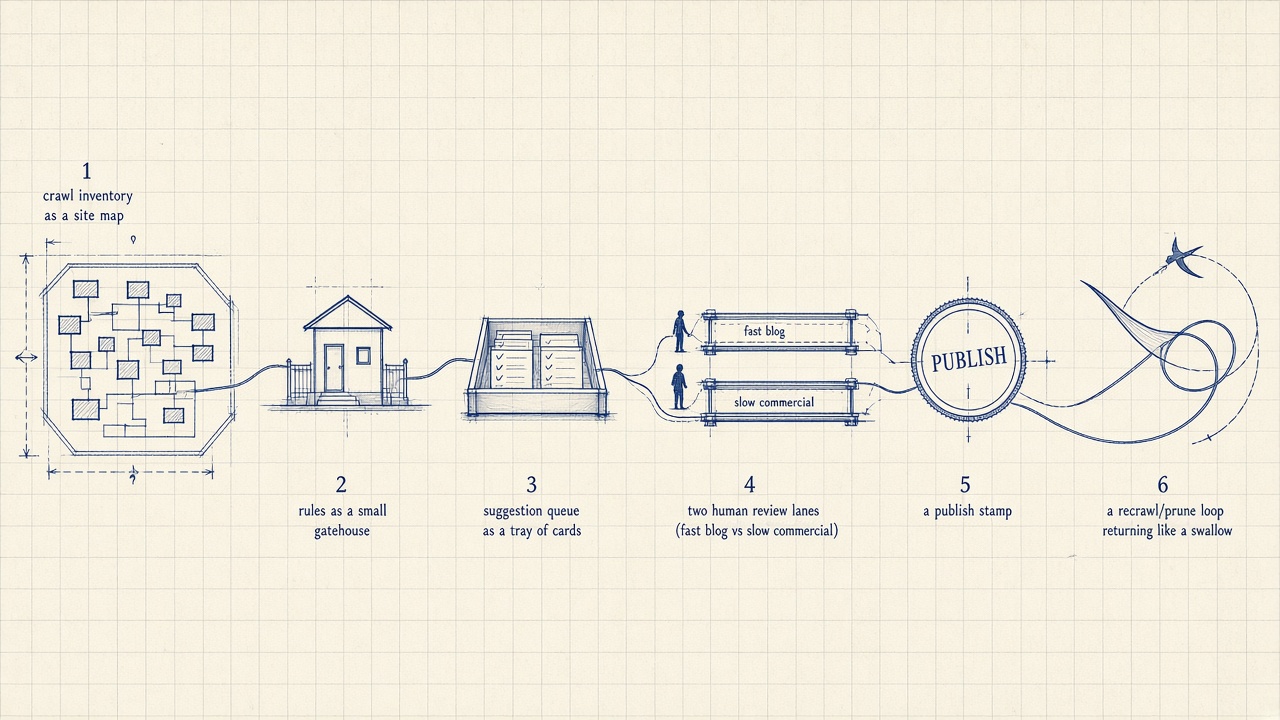
Once those three lanes are encoded, the remaining work is a short loop—not another content-ops playbook. Inventory, rules, suggestions, review, publish, recrawl, prune. That is the linking gate inside research-to-publish: discovery and matching stay automated, and the queue is what keeps volume from outrunning the lanes you just encoded.
Start with a live inventory: which URLs exist, which templates they sit on, which hubs they belong to, and how many internals they already send or receive. Overlay allow/deny lists and page-type rules, plus a hard cap on links per template so a supporting post cannot become a dump of every related URL. The tool then drafts suggestions against that snapshot. Humans never start from a blank page; they start from a filtered batch.
Batch by risk, not by calendar convenience
Ship informational batches that already sit in the auto-insert lane without waiting for a weekly meeting. Hold pillars, mixed-intent pages, and new templates in a weekly suggest-only queue. Money-page suggestions—and anything that would change a conversion path—get same-day review or they do not go live. The cadence follows risk, so volume never outruns judgment.
Who owns what on a lean team
One person owns the ruleset: page types, exclude lists, max links, and when a source is too valuable to auto-insert. Writers approve in-body context—whether the sentence actually supports the destination and whether the anchor reads like a person wrote it. SEO owns hub architecture and programmatic templates: which parent is canonical, which cluster is allowed to interlink, and which parameterized URLs stay blocked. Logged one-click overrides keep that split honest.
After each publish wave, recrawl. Confirm the new internals resolved, that sources did not cross their caps, and that no circular pairs appeared in a cluster. Once a month, prune: drop redundant, outdated, or competing internals so the system is not a one-way adder. Automation that only inserts will eventually bury the hubs you meant to protect.
Writers can run a short checklist without tying the process to any one vendor: confirm the destination is indexable and in-scope; confirm the sentence still makes sense with the suggested anchor; skip exact-match commercial and branded terms unless SEO has approved them; leave money, pillar, and unique programmatic intros in draft; flag anything legal, medical, or financial. Then publish the batch and let recrawl plus prune close the loop.
The loop — Run inventory → rules → suggestions → risk-batched review → publish → recrawl → prune, with one ruleset owner, writers on sentence context, and SEO on hubs—so automation adds links without silently rewriting the pages that earn money.
The mistakes that make a linking tool look broken

Once that loop is running, most “the tool is broken” moments are really policy gaps. The crawler and matcher did what they were asked; nobody told them what never to touch, what not to celebrate, or when to take links away.
Skip a deny list and the same engine that helps a supporting guide will happily rewrite checkout, legal, thin tag pages, and parameterized junk. Those URLs were never meant to be link farms. Vanity metrics make it worse: inserts per week look healthy while hubs turn into dump pages and money pages leak attention to related-but-not-converting posts.
Programmatic templates fail in a quieter way. If every location or SKU page gets the same three anchors, the copy reads thin and crawl budget piles onto near-duplicates instead of unique parents. Automation that only adds never prunes, so the graph becomes spaghetti: circular pairs, over-linked sources, and orphans that no longer deserve the slot. And a relevant target with an unnatural anchor still fails the reader—the sentence has to earn the click.
Fix the policy, not the crawler. Put deny lists in before the next blast, prune on a schedule, and score success by whether users and equity actually reach hubs and conversion URLs—not by how many internals you shipped.
Judge outcomes, not volume — Judge the tool by hub paths and conversions, not insert volume—and keep deny lists, prune jobs, and in-sentence review in the loop so automation never looks “broken” on the pages that matter.
Key Takeaways
Map your templates into auto-insert, suggest-only, and block, then run the next linking batch through those gates instead of chasing insert volume.
Frequently Asked Questions
You Might Also Like
- Automation Internal Linking Automation: How to Scale Links Without Manual Work
- Automation SEO Automation: Tools, Workflows, and What to Automate First
- Automation Programmatic SEO: How to Scale Pages Without Thin Content
- Strategy How to Scale Content Marketing Without Diluting Quality
- Comparisons Best SEO Automation Tools in 2026 (Compared by Job-to-Be-Done)