Editorial Calendar Software vs a Brief Queue: What Lean Teams Actually Need

Most lean teams do not have an ideas shortage. They have a coordination problem that looks like a software problem. Editorial calendar software is a shared view of owners, status, and dates. It does not decide which SEO page is allowed to exist, and it will not fill an empty pipeline.
A ranked brief queue should stay the system of record. Lock a publish date only after the brief, the cluster home, and a named reviewer are real. Iriscale’s lean-team model treats the calendar as a ranked queue and applies dates only after intent is clear. Storyflow describes the opposite failure: an empty Tuesday feels like a failure, so something gets published just to fill the slot.
The buy rule is narrow. Marketing Scoop’s 2026 guidance is that a solo publisher doing fewer than about four pieces a month is fine on a spreadsheet, while a board starts to earn its keep once publishing is weekly and more than one contributor is involved. The rest of this piece applies that rule: what the calendar is for, when a sheet is enough, and what you should refuse to automate.
- Editorial calendar software coordinates owners, status, and dates; it does not choose which SEO page should exist.
- Keep a ranked brief queue as the record and assign a publish date only after the brief, cluster home, and reviewer are real.
- Buy a calendar when weekly publishing involves more than one contributor, or the team is past about 3–4 people.
- A solo operator under roughly four pieces a month can stay on a spreadsheet.
- Empty calendar slots pressure teams to publish filler; a brief queue refuses the slot instead.
What Editorial Calendar Software Is, and How It Differs from a Content Calendar or Social Scheduler

Editorial calendar software is a coordination layer. It records who owns a piece, what status it is in, and which date it is supposed to ship. It does not decide which SEO page is allowed to exist, and it does not rank ideas. Those calls belong upstream, in a brief you have already accepted.
At small scale, an editorial calendar and a content calendar are nearly the same shared view of topics, deadlines, and publish dates. Enterprise teams often split strategy from production and keep two views. A one- to five-person SEO team should not buy that split just to look organized. One shared schedule is enough until handoffs, not empty date boxes, are the real problem.
Three jobs that look alike and are not
- An editorial or content calendar coordinates owners, status, and dates for work already on the list.
- A social scheduler times posts to networks. It does not produce an indexable page.
- An SEO publishing schedule tracks a URL, a search intent, a brief, and a reviewer. Those fields are the page, not the grid.
Mixing those jobs is how teams end up with a pretty grid and nothing a search engine can index. A social post can go out on Tuesday whether or not a URL exists. An SEO piece cannot. If the brief, the cluster home, or the reviewer is still missing, the date is a wish, not a schedule.
Small and medium buyers already want a clear schedule and simple ownership without a heavy rollout. They accounted for about 42.3% of 2025 content calendar software revenue, or USD 375.30 million. Cloud tools dominated the category that year, taking about 88% of revenue (USD 780.17 million), so the purchase is almost always a SaaS seat, not a local install. Name the job before the demo: coordination of work already accepted, not idea generation and not social posting.
Coordination only — Editorial calendar software tracks owners, status, and dates. It is not a strategy engine, not a second view a small SEO team needs, and not a social scheduler.
A Brief Queue Ranks Accepted Work. Dates Come Last.
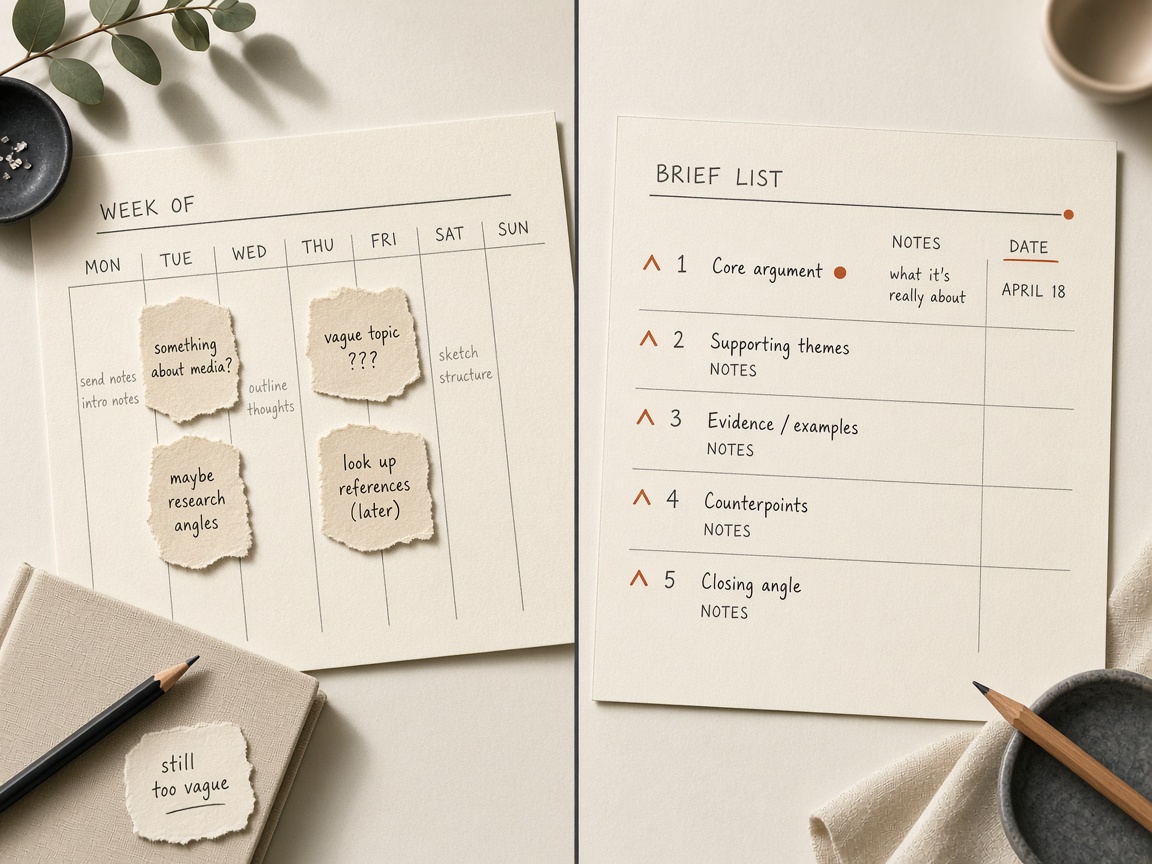
Once the job is named — coordinate work the team has already accepted — the next question is where that work lives before anyone locks a date. A brief queue is a ranked list of pieces you have already said yes to. A dated editorial calendar is a grid that assumes a slot should be filled. Those are different systems. Dates belong on the queue only after intent is clear, not because a week still has an open cell.
Score and rank ideas first, then treat the calendar as that ranked queue rather than a weekly obligation. Iriscale’s lean-team model does exactly that: the calendar becomes a ranked queue, and dates come later. That operating picture is already laid out in a lean-team calendar guide, so there is no need to rebuild the scoring sheet here. The useful move is to keep the date off the item until the idea has earned a place in the order.
Empty slots are how thin or off-intent pages get a URL. Storyflow describes the pressure plainly: the empty Tuesday feels like a failure, so something gets published to fill it. A small team does not have spare capacity to invent a real page on deadline. The slot wins, and search intent loses. The page exists because a date existed, not because a reader needed it.
The brief behind the slot matters more than the calendar view. Storyflow’s small-team scoring weights the plan and the brief behind each slot at 30%, higher than the calendar view itself. That weighting is the right priority even when the tool you already use is not built that way. A prettier grid does not repair a weak brief.
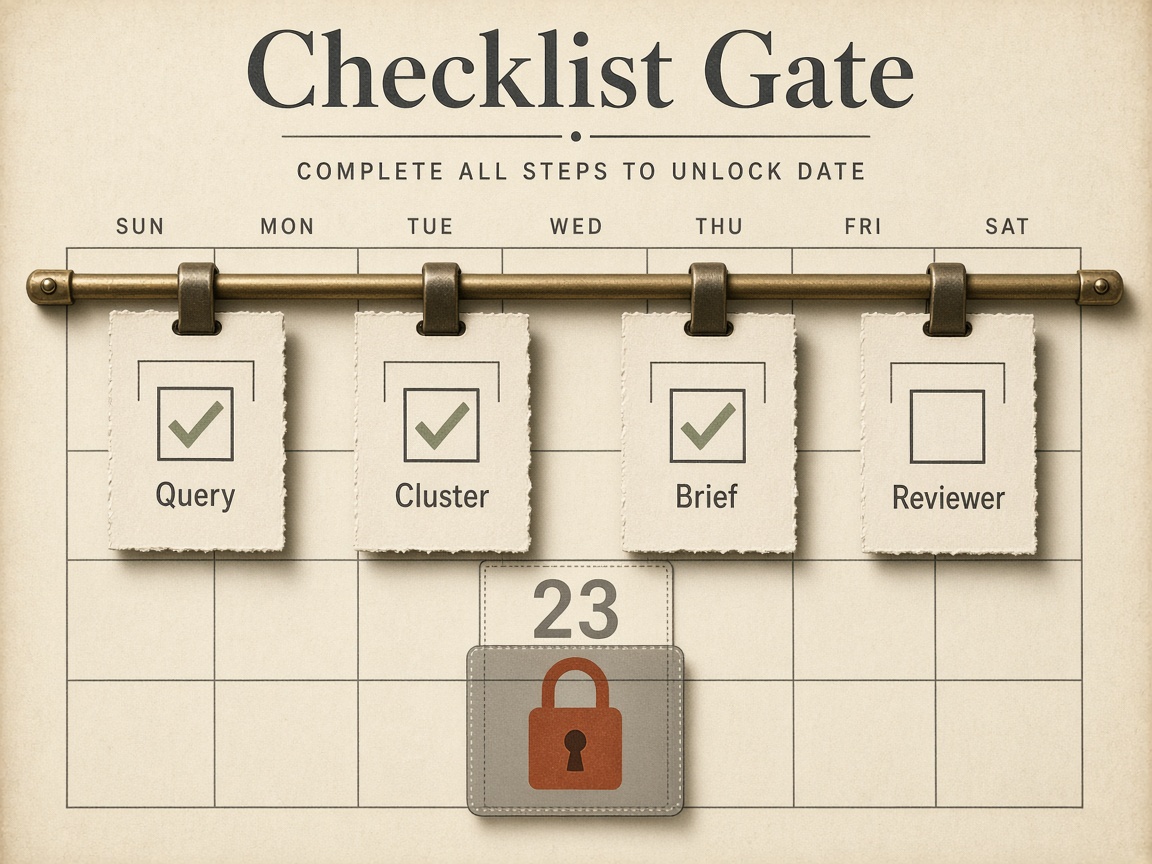
The fail-closed rule is the practical difference. The date stays empty until a cluster home, a real SEO brief, and a named reviewer exist. A queue refuses the slot. A calendar invites filler. Software can display either habit. It should not be allowed to choose the habit for you.
Fail closed — Keep a ranked brief queue as the system of record and leave the publish date blank until the cluster home, the SEO brief, and a named reviewer are real.
What Editorial Calendar Software Fixes, and What Stays Broken
Editorial calendar software fixes lateness. It shows what is due, who owns it, and what slipped. That is the coordination job, and it is a real one. It does not fill an empty pipeline, and it does not choose a search intent. A ranked brief queue still has to decide which page is allowed to exist before any date is worth locking.
For a team of about 2 to 10 people, the hard part is not the date grid. It is the plan, the brief, approval, and cost per seat. Buying a prettier grid leaves those four jobs broken. You can see Tuesday’s slot and still have no accepted work behind it.
Drafting a piece and operating a publishing pipeline are different jobs. Mixing them in one tool is what creates the bottleneck the calendar was supposed to remove. A writer needs a packet they can execute. A pipeline needs owners, status, and handoffs. One screen that tries to be both usually hides which of those is actually stuck.
What has to be true before a publish date is allowed
Lock a date only after the packet is real. If any of these is missing, the slot stays open. Stage-by-stage detail belongs in the brief-to-publish workflow guide; the rule here is simpler: no packet, no date.
- A target query and a clear search intent
- A cluster home, or a justified reason for a new URL
- A brief a writer can execute without guessing the angle
- A named reviewer, not a role that “someone” will cover
- A status that is past “idea” — accepted work, not a maybe
Leave the slot open — Calendar software solves lateness — due dates, owners, and slips — not an empty pipeline or a missing intent. Keep the date blank until the brief packet is real.
When a Lean SEO Team Should Buy Calendar Software
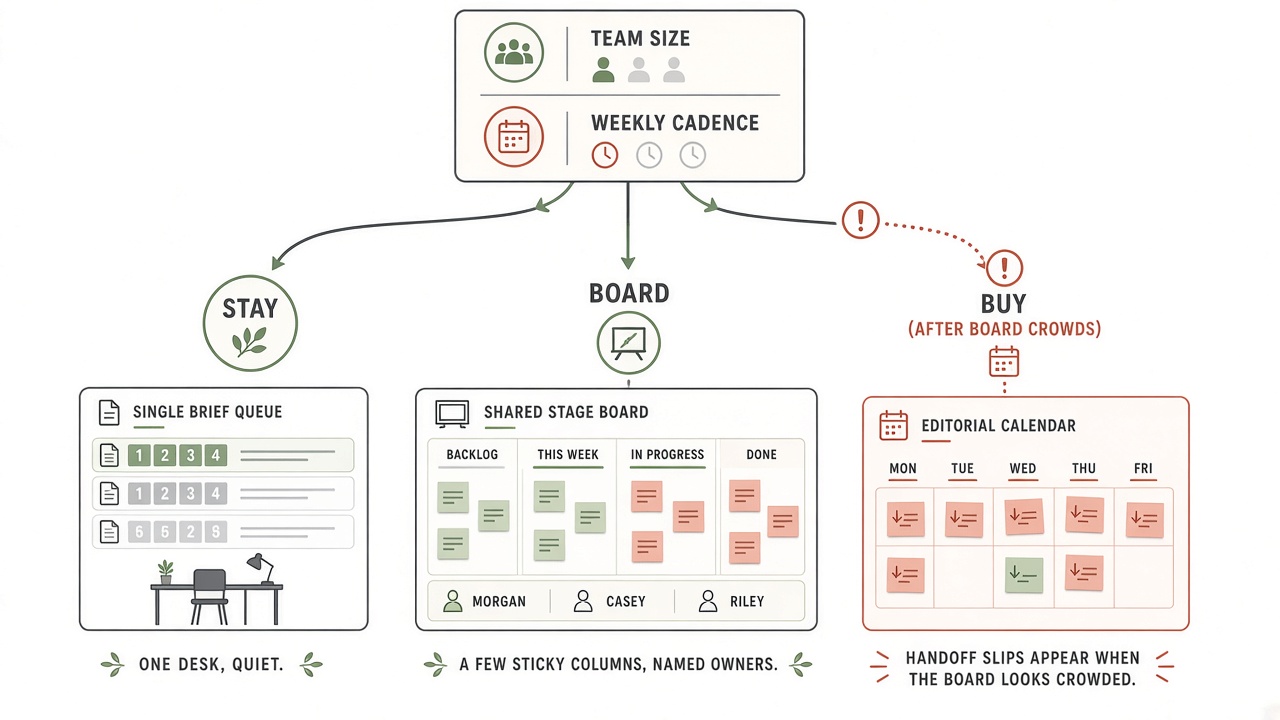
Once the calendar is only coordinating work you have already accepted, the buy decision is narrow. A lean SEO team should stay in a spreadsheet or a basic calendar while one person publishes fewer than about four pieces a month. Buy editorial calendar software — and even a shared board — only when handoffs are the bottleneck, not when the idea list feels messy.
Most teams weighing this are still in sheet territory. In a 2025 B2B benchmark of 1,186 marketers, content teams typically have two to five dedicated people, and 24% operate with no dedicated content team at all. A cluttered backlog, overlapping drafts, or a Tuesday that looks empty are planning problems. They do not, by themselves, justify a paid coordination layer.
A board starts to pay for itself once publishing is weekly and more than one contributor is involved. Past about three to four contributors, leave the spreadsheet for a board with stage ownership so each handoff has a named owner. Purpose-built editorial calendar software is the step after that, not the first upgrade from a ranked brief queue.
Capacity still caps the cadence you are allowed to schedule. About 15 focused hours a week and 5–7 hours per finished post implies a ceiling of two to three pieces a week, not five. Do not buy software to place dates on work you cannot produce. A paid view of empty slots will not create the hours, and it will not choose which SEO page is allowed to exist.
The queue is the bottleneck when work waits on a person, not on a missing idea: reviews pile up, owners are unclear, or cycle time stretches past a few days. Median time from brief approval to publication is about 3–5 days for a solo operator and 5–7 days for a two-to-six-person pod. Slower than that, with more than one contributor, is a handoff problem — the job a calendar actually fixes.
Run those three moves in order. Skipping to a purpose-built calendar while you are still solo, or while reviews finish inside a few days, pays for a view of work the queue already ranks. If cycle time is slow because nobody has accepted the brief, the fix is the queue rule, not a seat.
Buy signal — Pay for editorial calendar software when weekly publishing, more than one owner, and cycle time past a few days show that handoffs — not ideas — are what stall accepted work.
Which Jobs Should Stay Human Inside the Calendar?
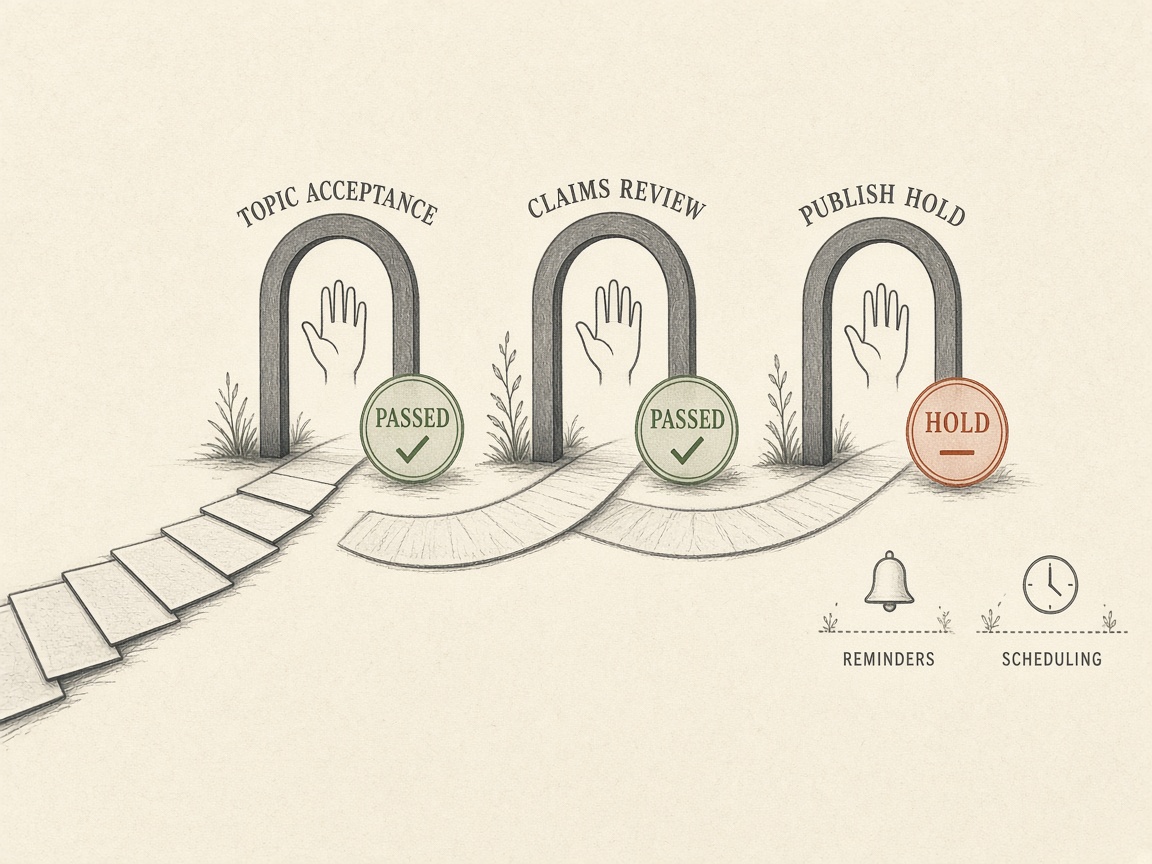
Buying the tool does not hand it the quality gate. A human still accepts the topic, checks claims, and holds publish when the packet is incomplete. Those three jobs are the ones a date grid cannot own, even after the board already shows owner, status, and slip.
Most teams still lack formal AI guidelines — 63% in one cited benchmark — so automation does not replace claim review. A generated draft is not an accepted brief. Someone still has to confirm the target query, the cluster home, and that the facts in the packet are safe to publish before any date locks.
Refuse tools and settings that auto-fill empty slots and publish without assignees, an approval chain, or a second-person review. A production engine built that way can ship with no assignees, no approval chains, no comment threads, and no shared workload view. That is a quality risk, not a time saver: it reopens the Tuesday-shaped pressure a ranked queue was meant to refuse.
Safe automation is narrower. Reminders, stage moves after a human accepts the packet, and scheduling of work that already passed the hold are coordination, not judgment. If the product’s selling point is filling the calendar for you, it is solving the wrong problem for SEO. The queue stays the system of record; the calendar only dates work a person has already accepted.
Stay human — Keep topic acceptance, claims review, and the publish hold with a person. Automate reminders and scheduling only after that packet is real.
How Much Content Calendar Software Costs a Team of One to Five

Knowing which jobs stay human does not settle the invoice. For a team of one to five, content calendar software is a per-seat bill—vendor pages checked in August 2026 cluster around $10 to $20 a person each month—and that price, not the feature list, decides the buy. Purpose-built calendars do not automatically beat Notion, Airtable, Asana, or Trello. They earn a seat only when owner, due date, and slip are the view you still cannot see.
A few dollars per user becomes a serious annual bill at five people, on top of stacks teams already underuse. A $7 seat versus a $20 seat is a four-figure annual gap for a five-person team. Run that math on the people who will actually log in, including reviewers, before the demo ends.
Those three figures come from vendor pages checked on 7 August 2026, not from a comparison roundup. CoSchedule’s own page also lists $29 if you pay month to month, and other 2026 roundups still quote CoSchedule nearer $29. Recheck the week you buy. A roundup is not a quote.
The category is large, which is why every empty date slot gets a sales pitch. The worldwide content calendar software market stood at USD 886.58 million in 2025 and is projected to reach USD 2.29 billion by 2032. Growth explains the pitch. Market size is not a reason to add a seat.
Lean B2B teams are rarely starting from a blank login. They commonly already run 8–12 marketing and sales tools, and stack utilization sits around 49%—less than half of what those tools can do. Another login that nobody opens is a cost, not a system of record.
When Notion, Airtable, Asana, or Trello is enough
No content calendar tool scored above 6 on every criterion in a six-criterion score built for small teams, which is why those teams pair a planner with a publisher. No product covers plan, brief, approvals, cost, and publishing at once. A solo creator is usually fine on a free visual pipeline such as Trello. A small team’s bottleneck is collaboration and review, not enterprise governance. Choose by the missing job: a database if you need brief fields, a board if you need stage ownership, a purpose-built calendar only if owner, due date, and slip are the view you cannot get without a second tracker. The ranked brief queue remains the record either way.
Seat math — Pay for the missing owner-and-slip view, not for a fuller feature list. At five people, a few dollars per seat is a four-figure annual bill, and the brief queue stays the system of record.
Annual Cost for a 5-Person Team
How to Connect a Calendar Without Two Sources of Truth
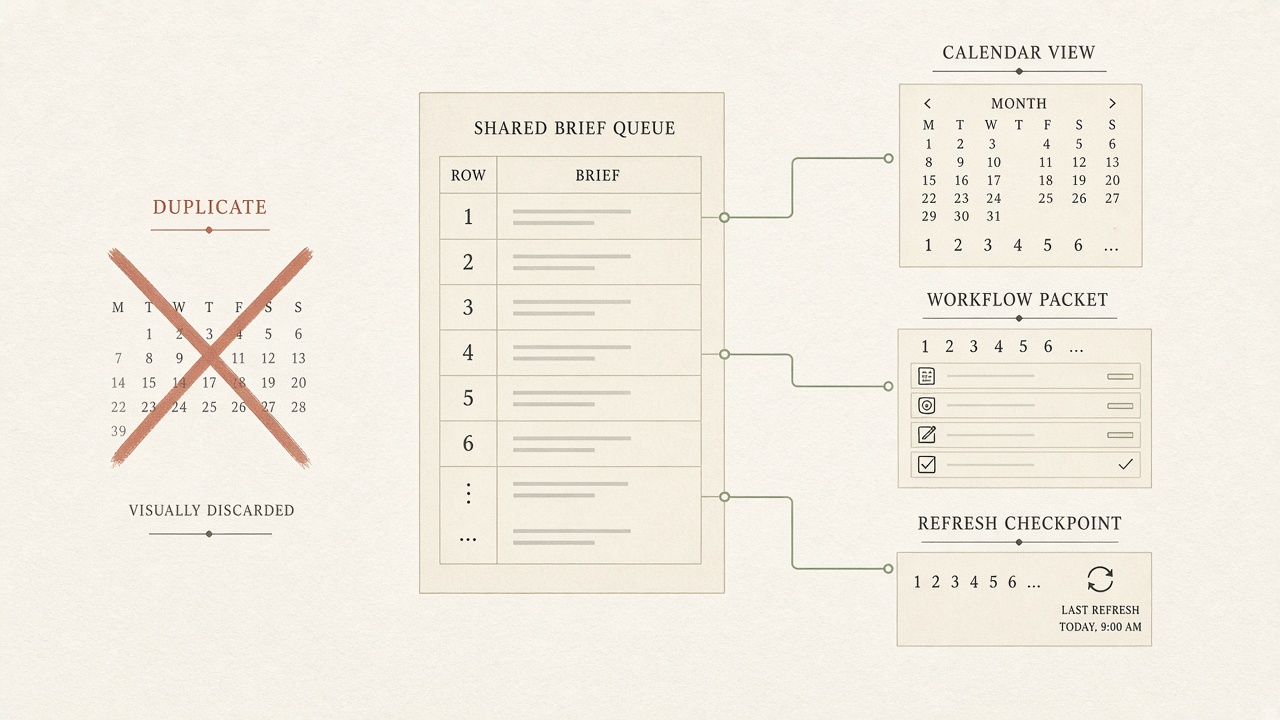
Connect a calendar by letting one record win. If you buy editorial calendar software, it displays status and dates. The brief queue, the workflow packet, and the refresh decision stay in the hubs you already use—not as a second list of topics. A one-person SEO stack that skips software should track only what changes the ship decision: query and intent, URL or cluster home, brief status, reviewer, publish hold, and the next refresh checkpoint. Leave the sheet layout to a one-person calendar template; do not rebuild the grid just to feel organized.
Put refresh debt in the same queue
A useful calendar treats a topic as a recurring item with refresh checkpoints, not a one-time publish date. Refresh debt sits beside new briefs in that same ranked queue. Prefer a same-URL update unless a new URL is justified. Do not open a second calendar for updates.
- Link the refresh hub for the update-versus-new-page gate.
- Link the workflow hub for the packet: brief, cluster home, and reviewer.
- Link the content-ops hub for who owns the next move.
If the calendar and the queue disagree, the queue wins and the date comes off until the packet matches. That is the whole connection: software coordinates work already accepted, and an empty date is still a better record than a slot filled to keep two systems looking busy.
One record — The brief queue remains the system of record. A calendar only shows owner, status, and dates, and it loses whenever those dates outrun the packet.
Key Takeaways
Before you book a demo, name the handoff the tool must show—owner, status, and slip—and keep the ranked brief queue as the record those dates display.
Frequently Asked Questions
You Might Also Like
- Workflows SEO Content Calendar: How Lean Teams Schedule Briefs Without a Bottleneck
- Publishing Flows for SEO Publishing: What the Stack Automates vs What You Still Own
- Workflows Content Ops for Lean Teams: Roles, Handoffs, and SLAs
- Workflows Who Signs Off an Automated Article? Roles for Lean Teams
- Measurement How to Export Search Console Queries Into a Brief Queue