AI Concierge: How an AI Online Assistant Handles Customer Queries

When a visitor asks whether a product will fit, a policy will apply, or a workflow will actually work for them, the difference between a bounce and a resolution is whether something on the page can finish the conversation. An AI concierge is that closer: an AI online assistant that greets the visitor, understands intent, retrieves the right knowledge or product data, and either resolves the query or hands it to a human with context intact.
A basic website chatbot follows scripts and decision trees. A concierge runs an operating loop—understand, retrieve, resolve or escalate, then log. Those logs are not a support afterthought. They are a map of demand: the same questions people type into search, into your helpdesk, and into the widget on your site. If you already publish at scale, that map is the shortest path from “we keep answering this in chat” to “the page that should have ranked already exists.”
This playbook is for operators who need more than a chat bubble. You will see how an AI concierge differs from rule-based bots and from a standalone AI article writer, how the query flow actually works on storefronts and content sites, where Shopify-style shopping assistants fit, and how to wire CMS, catalog, and helpdesk so every unresolved question improves the next article you publish.
- An AI concierge resolves multi-step customer queries with personalization and human handoff; a scripted website chatbot mostly follows trees.
- The operating loop is greet, understand intent, retrieve knowledge or product data, resolve or escalate, then log the outcome.
- Query logs should feed content automation and SEO briefs so repeated support questions become pages that rank and deflect.
- Choose a full concierge when you need catalog-aware selling, support deflection, and a feedback loop—not only a chat widget or an AI article writer.
- Judge the system on resolution rate, CSAT, deflection, and conversion, with CMS, helpdesk, and catalog integrations plus basic privacy controls.
What an AI Concierge Is (and Why It Is Not a Website Chatbot)
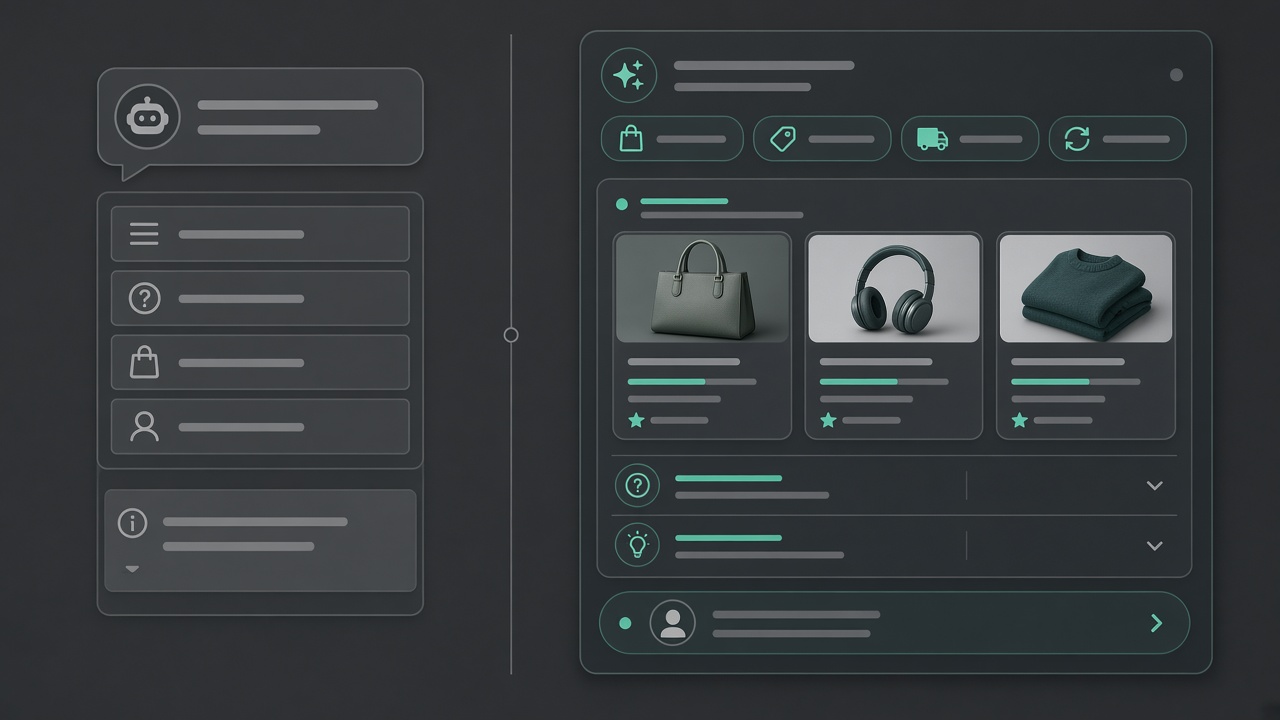
That last clause is the real definition. An AI concierge is the on-site layer that takes a visitor’s question, works it through to an answer or a clean handoff, and records every miss so your publishing system can close the same gap later. If you are evaluating tools, judge them on that loop—not on how clever the greeting sounds.
A typical website chatbot is a script with a chat skin. It matches keywords, walks a decision tree, and often drops a generic FAQ when the path runs out. Multi-turn conversation is brittle: change the intent mid-thread and the tree stalls. Because it is not retrieving live product or help-center content, answers drift the moment inventory, pricing, or policy changes.
A retrieval-backed assistant treats the session as work with memory. It can ask one clarifying question, keep size, SKU, locale, and policy in view, and ground each reply in your catalog and published help articles. That is why it belongs on a Shopify-style storefront and on a content site alike: it is answering from your systems, not from a generic model dump.
What separates a concierge from a chat gimmick
- Proactive guidance. It can offer the next useful step—fit, shipping cutoff, a related guide—without waiting for a perfectly worded prompt.
- Catalog and help-center grounding. Replies track what you actually sell and what you actually promise, so the assistant does not invent stock, shipping, or policy.
- Clean escalation. When it cannot finish the job, it packages intent, history, and missing facts for a person instead of looping a dead-end apology.
Position it as the query layer, not a marketing widget. Capture bots exist to keep people on the page. A concierge exists to finish the reason they opened the chat—then log what it could not resolve so your publishing system can turn that gap into support and search content. A standalone AI article writer never sees those live questions; a scripted chatbot never writes them down in a form you can publish from. The concierge sits between the two.
On-site query layer — An AI concierge earns its place by resolving multi-turn questions from your catalog and help content, escalating cleanly, and logging gaps—not by sounding chatty.
The End-to-End Query Path: Greet, Retrieve, Resolve, Log
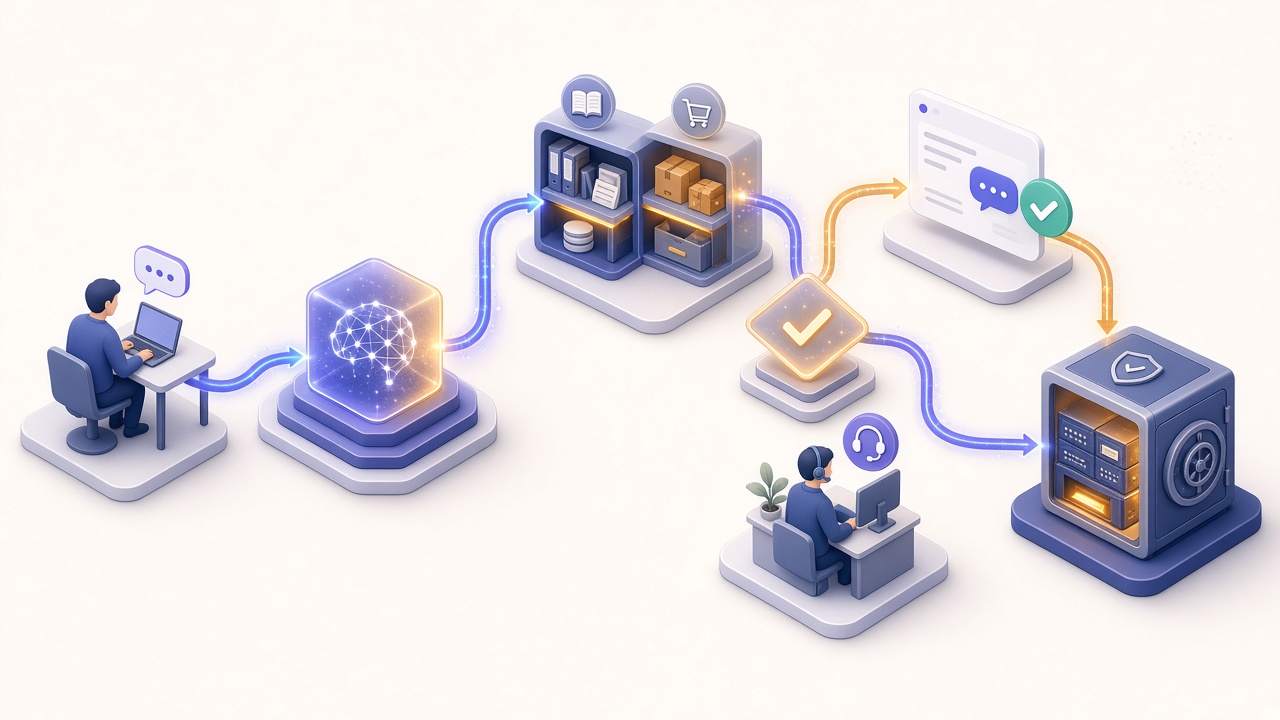
That middle seat only pays off if the assistant can finish the visitor’s job in one sitting. People on the page do not care how you labeled the product; they care whether the next answer is correct, complete, and fast. The concierge earns its keep by closing that loop on-site, then leaving a structured trail so the same question does not have to be solved again in support or search.
Every session—whether it is a return, a product comparison, or a hunt for a policy page—follows the same five moves.
Intent, grounding, and the handoff
Intent is not a sticker slapped on the first message. Support threads cluster around orders, accounts, warranties, and policies. Sales threads ask what fits, what is in stock, and how two products differ. Navigation threads are wayfinding: which page, which form, which setting. Mixed intents are normal, so a competent assistant re-classifies as new facts appear rather than locking the visitor into the first guess.
Grounding is what keeps that fluency honest. Before it replies, the concierge retrieves passages from your help center, return and warranty policies, and live catalog fields such as price, inventory, variants, and care instructions. If retrieval comes back thin, the honest move is to say so and escalate—not to fill the silence with a plausible guess. Hallucinations get starved when answers are allowed only when your own documents and product data can support them.
Escalation is a rule, not a failure. Hand off when confidence is low, the request is account-sensitive, the visitor asks for a person, or policy requires a human. What gets passed matters more than the transfer itself: the full transcript, detected intent, retrieved sources, customer identifiers you already have permission to use, and the last attempted answer. The agent should walk in already briefed.
The log is publishing fuel, not a chat archive. Store the original wording, intent tags, which documents were used, whether the visitor confirmed the answer, and a flag for “we had no source for this.” Those flags become briefs: the question that stalled on-site is the article, FAQ, or product copy your content automation should write next. Ops can read repeated escalations as process bugs; editorial can read them as demand.
End-to-end resolution — A concierge earns its keep only when it greets, detects intent, answers from your own docs and catalog, hands off with a complete brief when it cannot, and logs every gap so publishing can close the question for the next visitor.
Fit, Tracking, and Demos: Use Cases That Move Conversion and CSAT

Read that way, the highest-volume flags are not abstract SEO topics. They are the shopping and support questions already happening on the site. On a storefront, the work that earns its keep sits between a product page and a purchase: size, fit, bundles, and comparisons. A Shopify AI shopping assistant only helps if it retrieves catalog attributes, size charts, and inventory before it speaks—then either completes the decision or logs the gap that should become product copy.
Size, fit, bundles, and honest comparisons
A fit question is almost never one question. The visitor asks whether a jacket runs small, then whether the same size holds in a heavier fabric, then whether the bundle costs less than the pieces bought separately. Answering the first and stalling on the second reads as not answering at all, so retrieval has to land in one pass rather than one field at a time.
- Size and fit. Charts and measurements, plus how this variant runs against the rest of the range—not a link to a PDF the visitor has to interpret alone.
- Bundles and compatibility. What is in the kit, what it replaces, and whether the accessory fits the model the customer already owns.
- Live inventory at variant level. So the recommendation and the add-to-cart button agree.
- Policy in the same breath. Return window and exchange rules, because “will it fit” and “what if it doesn’t” are one decision.
Honest comparison is the harder half. Asked which of two products suits them, the useful answer names the real trade-off from your own product data—weight against durability, capacity against footprint—and says plainly when the cheaper option is the right call. An assistant that upsells on every turn teaches visitors to stop asking it anything.
Order status, returns, and the threads that flood support
Where fit questions move conversion, post-purchase questions move CSAT and cost. “Where is my order” is the most answerable question in ecommerce and one of the most expensive to answer by hand: the data already exists, and a person still has to go and read it. The more valuable behaviour is catching the moment it stops being a tracking question—a late parcel becoming a refund, a wrong size becoming an exchange and then a second fit question. That is where a scripted widget drops the thread and a human inherits a conversation with no history.
Guided discovery and the considered purchase
Higher-consideration catalogs have a third pattern: the visitor does not yet know what to ask for. Guided discovery is the assistant asking the two or three qualifying questions a good salesperson would—use case, constraint, budget—then narrowing to a shortlist it can justify from your specifications. On software and B2B sites the same thread ends in a booked demo, and the value is the context that travels with it: what they were evaluating, which objection surfaced, what went unanswered. Sales opens the call already briefed, the same way support does.
Use cases, not features — Fit questions move conversion, post-purchase threads move CSAT and cost, and guided discovery moves considered purchases; all three are multi-turn journeys, so judge the assistant on resolved sessions and what they ended in, not on chat volume.
When You Need a Full Concierge, Not Just a Bot or a Writer
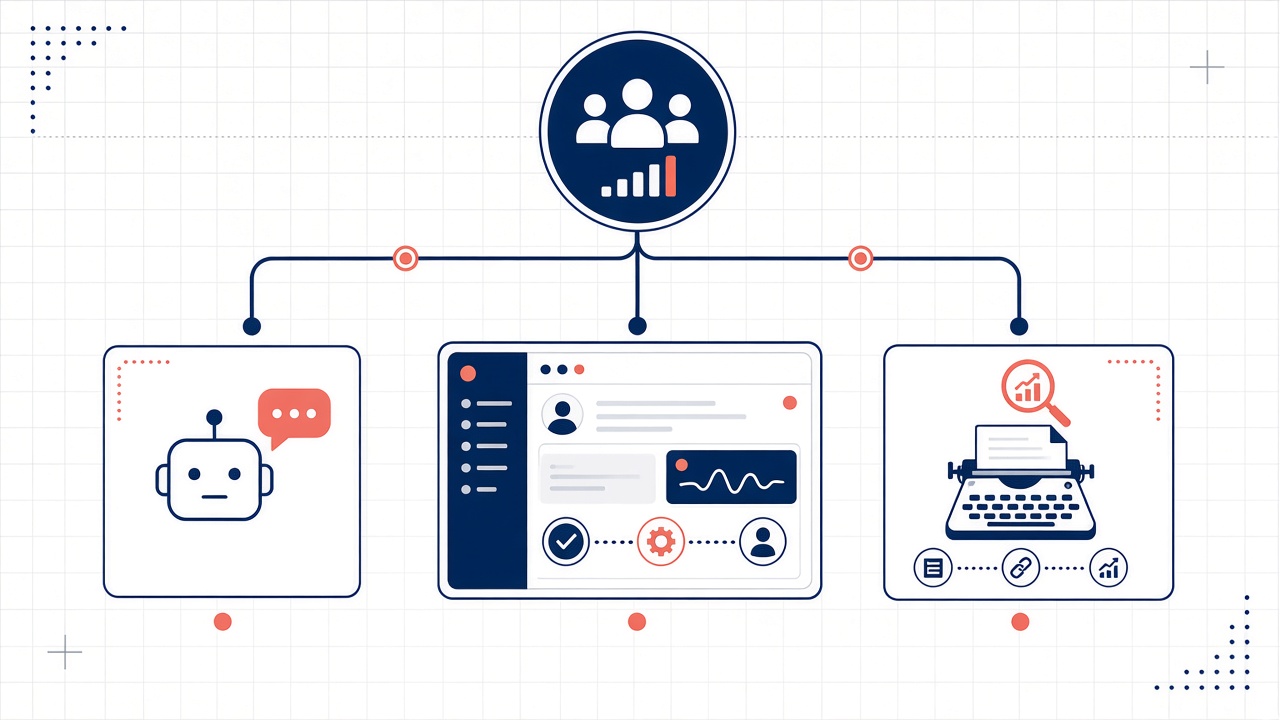
Those journeys—size, fit, bundles, and honest comparisons—also mark the line between a full concierge and a lighter tool. A simple website chatbot can greet and point at a FAQ. An AI article writer can later turn the same theme into a page. Neither stays with the visitor through a multi-step question, retrieves catalog and policy before answering, or escalates with a complete brief when the knowledge base runs out.
Four signals you need the full layer
Choose the concierge when these conditions stack, not when a single one looks impressive in a demo.
- Volume with real follow-ups. Repeating questions justify live answers; unique follow-ups break scripts. If most visits are one-shot lookups, a lighter bot may be enough.
- Catalog complexity. Variants, bundles, compatibility, regional stock, and policy exceptions cannot live in a handful of canned replies.
- Multi-step journeys. The customer has to combine product, shipping, account, and comparison context in one conversation rather than bouncing between pages.
- Handoff needs. Exceptions still go to a person, and that person needs transcript, intent, sources, and last attempt—not an empty ticket.
Keep on-site query handling separate from offline writing. Content automation scales evergreen answers after the fact; it does not resolve a live shopping or support thread. Buying a writer and calling it a concierge leaves the storefront unattended. Buying a concierge and expecting it to replace your CMS leaves search and help docs thin.
Skip the enterprise suite when a focused concierge plus your CMS, helpdesk, and catalog feeds will close the loop. You do not need a platform that also wants to own search, identity, and ticketing on day one. You need grounded retrieval over your real content, a clean human handoff, and structured gap logs your publishing system can use.
The jobs stay complementary. The concierge answers in the moment. The publishing system turns logged gaps into articles and help that later visitors find in search, so the same question does not have to be solved live forever.
Live answers, then evergreen ones — Choose a full concierge when volume, catalog complexity, multi-step journeys, and handoffs stack up; keep the writer for scaling what the logs prove people ask.
From Pilot to Go-Live: Checklist, Stack, and Ownership
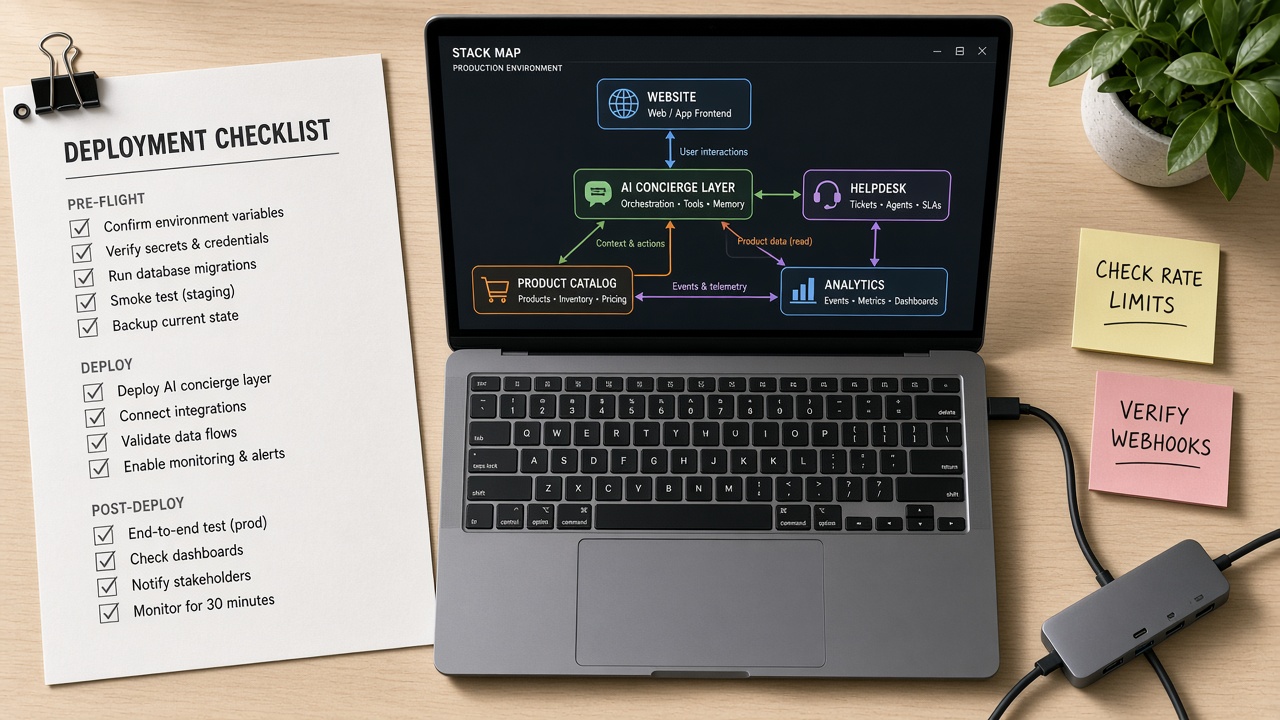
That live-to-evergreen loop only starts when the assistant is wired into the catalog, help center, and ticket tools your operators already trust. Deployment is a wiring job, not a widget install: scope a pilot, connect retrieval, name who owns the handoff, then review failed queries before you widen the surface.
A reusable checklist from pilot to go-live
Treat the first launch as a single-intent experiment, not a company-wide rollout. You want a clean retrieve-and-resolve path on one journey so the logs are usable from week one.
- Lock the pilot: one intent cluster (returns, fit, or order status) and one surface such as product pages or the help hub.
- Inventory sources of truth—help articles, policies, and product fields. If a fact is not in that set, it should not appear in the reply.
- Connect retrieval before you polish the greeting. Content, catalog, and helpdesk first; tone second.
- Write handoff rules: which intents stay in-chat, which go to a person, and what the brief must include.
- Run a closed beta on real traffic, then add intents only after the first cluster resolves cleanly.
- Go live with logging on so every gap can feed publishing later.
Integration points operators actually wire
Most teams need three connections, not an enterprise rebuild. Those are the systems the concierge retrieves from and the queue it hands off to.
- Help center or CMS — policies, how-tos, and shipping rules the model retrieves instead of inventing.
- Shopify or product catalog — variants, availability, price, and attributes so shopping questions resolve against live inventory rather than a stale FAQ.
- CRM or helpdesk — tickets, customer context, and the queue that receives an escalation brief when the concierge cannot finish the job.
Privacy, compliance, and who owns the escalation
Minimize personal data in prompts and long-lived archives. Do not keep payment details in transcripts. Disclose that the visitor is speaking with an assistant, retain logs only as long as support and content review need them, and handle access or deletion requests through the same ticket workflow you already run. Escalation needs a named owner—not “the bot”—so after-hours messages and failed handoffs have a person accountable for response time and tone.
Starter KPIs and the weekly failure review
You do not need a vanity dashboard. Track whether the concierge contained and resolved the thread, how visitors rated resolved conversations, whether repetitive tickets actually dropped, and whether catalog-assisted sessions completed a purchase or next step. Once a week, sample failed queries. Tag each miss as retrieval, missing policy, stale product data, or a true human-only case, then send repeating clusters to publishing so the next visitor can find the answer without opening another live chat.
Pilot before polish — Wire help, catalog, and helpdesk, name who owns escalations, and review failed queries weekly before you scale intents.
From Query Logs to Pages That Answer Before Chat Opens

Those repeating clusters are not a ticket dump. They are a demand map. Group them by intent—shipping exceptions, bundle fit, return windows, size—and each cluster is a topic visitors have already tried to learn. Transcript wording becomes the headline. Follow-ups become FAQ entries. The agent’s closing reply is the first draft of an answer that can live on a page and in the index the assistant retrieves from next time.
Clusters become briefs, then published answers
A brief worth automating carries more than a keyword. Package the cluster so a publishing workflow can draft something retrieval and search can both quote without stitching three documents together:
- The visitor’s original phrasing, not a rewritten search term
- Which source the concierge failed to retrieve
- The policy or SKU that was missing
- How the human actually closed the case
That packet is enough to ship a focused article or FAQ block: self-contained, scannable, and written so answer engines can lift a complete reply. Automated SEO publishing then places the piece where the site already expects it—help articles, guides, category copy—so the same question is findable before anyone opens chat.
Put the new page back in what the assistant cites
Publishing only works if the corpus changes. Once the article or policy is live in the CMS or help center, retrieval has to include it. Missing policy and stale product data close when live sources update and the next session cites the fresher page instead of improvising. Human-only cases stay with people; the rest should shrink as the published layer grows.
That dual lens—query layer plus publishing system—is how an AI concierge keeps earning its keep after go-live. It resolves the conversation in front of the visitor, then leaves a trail so content automation can answer the same question in support and in search. The next person never has to open chat to learn what this one already asked.
Logs to pages — Recurring query clusters become FAQs, content briefs, and AEO-ready answers; publishing those pages back into the knowledge sources is what lets the concierge cite fresher content on the next visit.
Key Takeaways
Inventory your help center, catalog, and helpdesk, then run a retrieve-first concierge pilot so live answers and published pages start closing the same customer questions.